

Welcome back to our Laravel 12 Task Manager series! In Part 1, we set up our development environment, and in Part 2, we implemented authentication and designed our database structure. Now it’s time to bring our Task Manager to life by building complete CRUD (Create, Read, Update, Delete) operations.
By the end of this tutorial, you’ll have a fully functional task management system where users can create, view, edit, delete, search, and filter their tasks.
What You’ll Learn in This Tutorial
- Understanding RESTful routing and resource controllers
- Deep dive into Laravel middleware
- Building dynamic forms with validation
- Implementing complete CRUD operations
- Adding search and filtering functionality
- Creating reusable Blade components
- Pagination and performance optimization
- User experience enhancements
- Best practices for code organization
Prerequisites
Before starting this tutorial:
- Completed Part 1: Environment Setup
- Completed Part 2: Authentication & Database Setup
- Understanding of HTML and basic CSS
- Familiarity with Blade templating basics
Understanding CRUD Operations
CRUD stands for:
- Create – Adding new records
- Read – Viewing/listing records
- Update – Modifying existing records
- Delete – Removing records
These four operations form the foundation of most web applications. Laravel makes implementing CRUD operations elegant and straightforward through:
- Resource routes
- Resource controllers
- Eloquent ORM
- Blade templates
- Form validation
Step 1: Routes and Controller Deep Dive
Let’s start by understanding how Laravel handles routing and how we’ll structure our task routes.
Understanding RESTful Routing
REST (Representational State Transfer) is an architectural style that uses standard HTTP methods. Laravel’s resource routes follow RESTful conventions:
| HTTP Verb | URI | Action | Route Name | Purpose |
|---|---|---|---|---|
| GET | /tasks | index | tasks.index | Display all tasks |
| GET | /tasks/create | create | tasks.create | Show create form |
| POST | /tasks | store | tasks.store | Store new task |
| GET | /tasks/{id} | show | tasks.show | Display single task |
| GET | /tasks/{id}/edit | edit | tasks.edit | Show edit form |
| PUT/PATCH | /tasks/{id} | update | tasks.update | Update task |
| DELETE | /tasks/{id} | destroy | tasks.destroy | Delete task |
Setting Up Resource Routes
Open routes/web.php and add our task routes:
<?php

use App\Http\Controllers\TaskController;
use Illuminate\Support\Facades\Route;

Route::get('/', function () {
    return view('welcome');
});

Route::middleware(['auth', 'verified'])->group(function () {
    Route::get('/dashboard', function () {
        return view('dashboard');
    })->name('dashboard');

    // Task resource routes
    Route::resource('tasks', TaskController::class);
});

require __DIR__.'/auth.php';
What just happened?
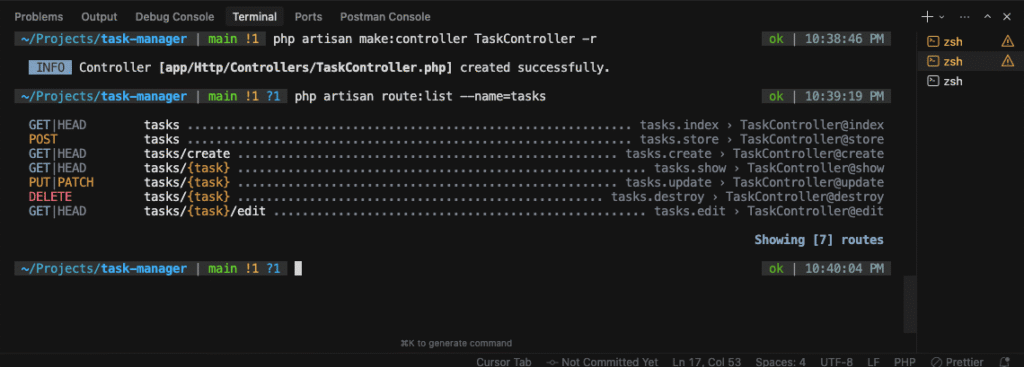
The single line Route::resource('tasks', TaskController::class) automatically creates all seven RESTful routes shown in the table above!
Verifying Routes
Let’s verify our routes were created:
php artisan route:list --name=tasks
Expected output:
Resource Routes vs Manual Routes
Resource Route (Recommended):
Route::resource('tasks', TaskController::class);
Manual Routes (Alternative):
Route::get('/tasks', [TaskController::class, 'index'])->name('tasks.index');
Route::get('/tasks/create', [TaskController::class, 'create'])->name('tasks.create');
Route::post('/tasks', [TaskController::class, 'store'])->name('tasks.store');
// ... and so on
Resource routes are cleaner and follow Laravel conventions.
Restricting Resource Routes
If you only need specific routes:
// Only index, show, and store
Route::resource('tasks', TaskController::class)->only(['index', 'show', 'store']);

// All except destroy
Route::resource('tasks', TaskController::class)->except(['destroy']);
Route Model Binding
Laravel automatically resolves Eloquent models in route parameters. For example:
// Instead of this:
Route::get('/tasks/{id}', function ($id) {
    $task = Task::findOrFail($id);
    return view('tasks.show', compact('task'));
});

// Route model binding does this automatically:
Route::get('/tasks/{task}', function (Task $task) {
    return view('tasks.show', compact('task'));
});
Laravel automatically queries the database using the {task} parameter and injects the model instance. If not found, it returns a 404 error automatically!
Step 2: Middleware Deep Dive
Middleware acts as a bridge between a request and a response. Think of it as a series of layers that HTTP requests pass through.
How Middleware Works
Request → Middleware 1 → Middleware 2 → Controller → Response
                ↓                ↓            ↓
           Can reject      Can modify    Processes
           request         request       request
Built-in Middleware
Laravel includes several middleware out of the box:
-
auth– Ensures user is authenticated -
guest– Ensures user is NOT authenticated -
verified– Ensures email is verified -
throttle– Rate limiting -
csrf– CSRF protection
Auth Middleware in Action
Our routes already use auth middleware:
Route::middleware(['auth', 'verified'])->group(function () {
    Route::resource('tasks', TaskController::class);
});
This ensures:
- User must be logged in (
auth) - Email must be verified (
verified)
Try visiting /tasks while logged out – you’ll be redirected to login!
Creating Custom Middleware
Let’s create middleware to ensure users can only access their own tasks.
php artisan make:middleware EnsureTaskOwnership
This creates app/Http/Middleware/EnsureTaskOwnership.php:
<?php

namespace App\Http\Middleware;

use Closure;
use Illuminate\Http\Request;
use Symfony\Component\HttpFoundation\Response;

class EnsureTaskOwnership
{
    /**
     * Handle an incoming request.
     */
    public function handle(Request $request, Closure $next): Response
    {
        $task = $request->route('task');

        // If task exists and doesn't belong to current user
        if ($task && $task->user_id !== auth()->id()) {
            abort(403, 'Unauthorized action.');
        }

        return $next($request);
    }
}
Registering Middleware
Open bootstrap/app.php and register the middleware alias:
<?php

use Illuminate\Foundation\Application;
use Illuminate\Foundation\Configuration\Exceptions;
use Illuminate\Foundation\Configuration\Middleware;

return Application::configure(basePath: dirname(__DIR__))
    ->withRouting(
        web: __DIR__.'/../routes/web.php',
        commands: __DIR__.'/../routes/console.php',
        health: '/up',
    )
    ->withMiddleware(function (Middleware $middleware) {
        $middleware->alias([
            'task.owner' => \App\Http\Middleware\EnsureTaskOwnership::class,
        ]);
    })
    ->withExceptions(function (Exceptions $exceptions) {
        //
    })->create();
Using Custom Middleware
Now apply it to specific routes:
Route::middleware(['auth', 'verified'])->group(function () {
    Route::get('/tasks', [TaskController::class, 'index'])->name('tasks.index');
    Route::get('/tasks/create', [TaskController::class, 'create'])->name('tasks.create');
    Route::post('/tasks', [TaskController::class, 'store'])->name('tasks.store');

    // Apply task.owner middleware to routes that need specific task
    Route::middleware('task.owner')->group(function () {
        Route::get('/tasks/{task}', [TaskController::class, 'show'])->name('tasks.show');
        Route::get('/tasks/{task}/edit', [TaskController::class, 'edit'])->name('tasks.edit');
        Route::put('/tasks/{task}', [TaskController::class, 'update'])->name('tasks.update');
        Route::delete('/tasks/{task}', [TaskController::class, 'destroy'])->name('tasks.destroy');
    });
});
Middleware Parameters
You can pass parameters to middleware:
Route::get('/tasks', [TaskController::class, 'index'])
    ->middleware('throttle:60,1'); // 60 requests per minute
Global vs Route-Specific Middleware
Global Middleware – Runs on every request Route Middleware – Only runs on specified routes
Our custom middleware is route-specific, which is perfect for our use case.
Step 3: Creating the Task Controller
Now let’s create our controller that will handle all task operations.
php artisan make:controller TaskController --resource
The --resource flag automatically creates all seven RESTful methods!
Open app/Http/Controllers/TaskController.php:
<?php

namespace App\Http\Controllers;

use App\Models\Task;
use App\Models\Category;
use Illuminate\Http\Request;

class TaskController extends Controller
{
    /**
     * Display a listing of the resource.
     */
    public function index()
    {
        //
    }

    /**
     * Show the form for creating a new resource.
     */
    public function create()
    {
        //
    }

    /**
     * Store a newly created resource in storage.
     */
    public function store(Request $request)
    {
        //
    }

    /**
     * Display the specified resource.
     */
    public function show(Task $task)
    {
        //
    }

    /**
     * Show the form for editing the specified resource.
     */
    public function edit(Task $task)
    {
        //
    }

    /**
     * Update the specified resource in storage.
     */
    public function update(Request $request, Task $task)
    {
        //
    }

    /**
     * Remove the specified resource from storage.
     */
    public function destroy(Task $task)
    {
        //
    }
}
Understanding Controller Methods:
-
index()– Lists all tasks (with pagination, filters) -
create()– Shows the create task form -
store()– Processes the create form, saves the task -
show()– Displays a single task’s details -
edit()– Shows the edit task form -
update()– Processes the edit form, updates the task -
destroy()– Deletes a task
Step 4: Building the Tasks Index Page (Read/List)
Let’s implement the index() method to display all tasks.
Implementing the Controller Method
Update the index() method in TaskController.php:
public function index(Request $request)
{
    // Start with base query
    $query = auth()->user()->tasks()->with('categories');

    // Search functionality
    if ($request->filled('search')) {
        $query->where(function($q) use ($request) {
            $q->where('title', 'like', '%' . $request->search . '%')
              ->orWhere('description', 'like', '%' . $request->search . '%');
        });
    }

    // Filter by status
    if ($request->filled('status')) {
        $query->where('status', $request->status);
    }

    // Filter by priority
    if ($request->filled('priority')) {
        $query->where('priority', $request->priority);
    }

    // Filter by category
    if ($request->filled('category')) {
        $query->whereHas('categories', function($q) use ($request) {
            $q->where('categories.id', $request->category);
        });
    }

    // Filter by due date range
    if ($request->filled('due_from')) {
        $query->where('due_date', '>=', $request->due_from);
    }

    if ($request->filled('due_to')) {
        $query->where('due_date', '<=', $request->due_to);
    }

    // Sorting
    $sortBy = $request->get('sort_by', 'created_at');
    $sortOrder = $request->get('sort_order', 'desc');
    $query->orderBy($sortBy, $sortOrder);

    // Paginate results
    $tasks = $query->paginate(10)->withQueryString();

    // Get categories for filter dropdown
    $categories = auth()->user()->categories;

    return view('tasks.index', compact('tasks', 'categories'));
}
What’s happening here?
-
with('categories')– Eager loads categories (prevents N+1 queries) -
filled()– Checks if request parameter exists and is not empty -
whereHas()– Filters based on relationship -
paginate(10)– Shows 10 tasks per page -
withQueryString()– Preserves filters in pagination links
Creating the Blade View
Create resources/views/tasks/index.blade.php:
<x-app-layout>
<x-slot name="header">
<div class="flex justify-between items-center">
<h2 class="font-semibold text-xl text-gray-800 leading-tight">
{{ __('My Tasks') }}
</h2>
<a href="{{ route('tasks.create') }}"
class="bg-blue-500 hover:bg-blue-700 text-white font-bold py-2 px-4 rounded">
Create New Task
</a>
</div>
</x-slot>
<div class="py-12">
<div class="max-w-7xl mx-auto sm:px-6 lg:px-8">
<!-- Search and Filters -->
<div class="bg-white overflow-hidden shadow-sm sm:rounded-lg mb-6">
<div class="p-6">
<form method="GET" action="{{ route('tasks.index') }}" class="space-y-4">
<!-- Search -->
<div>
<input type="text"
name="search"
placeholder="Search tasks..."
value="{{ request('search') }}"
class="w-full rounded-md border-gray-300 shadow-sm focus:border-blue-500 focus:ring-blue-500">
</div>
<!-- Filters Row -->
<div class="grid grid-cols-1 md:grid-cols-4 gap-4">
<!-- Status Filter -->
<div>
<select name="status"
class="w-full rounded-md border-gray-300 shadow-sm focus:border-blue-500 focus:ring-blue-500">
<option value="">All Statuses</option>
<option value="pending" {{ request('status') == 'pending' ? 'selected' : '' }}>Pending</option>
<option value="in_progress" {{ request('status') == 'in_progress' ? 'selected' : '' }}>In Progress</option>
<option value="completed" {{ request('status') == 'completed' ? 'selected' : '' }}>Completed</option>
<option value="archived" {{ request('status') == 'archived' ? 'selected' : '' }}>Archived</option>
</select>
</div>
<!-- Priority Filter -->
<div>
<select name="priority"
class="w-full rounded-md border-gray-300 shadow-sm focus:border-blue-500 focus:ring-blue-500">
<option value="">All Priorities</option>
<option value="low" {{ request('priority') == 'low' ? 'selected' : '' }}>Low</option>
<option value="medium" {{ request('priority') == 'medium' ? 'selected' : '' }}>Medium</option>
<option value="high" {{ request('priority') == 'high' ? 'selected' : '' }}>High</option>
</select>
</div>
<!-- Category Filter -->
<div>
<select name="category"
class="w-full rounded-md border-gray-300 shadow-sm focus:border-blue-500 focus:ring-blue-500">
<option value="">All Categories</option>
@foreach($categories as $category)
<option value="{{ $category->id }}"
{{ request('category') == $category->id ? 'selected' : '' }}>
{{ $category->name }}
</option>
@endforeach
</select>
</div>
<!-- Due Date Filter -->
<div>
<input type="date"
name="due_from"
placeholder="Due from"
value="{{ request('due_from') }}"
class="w-full rounded-md border-gray-300 shadow-sm focus:border-blue-500 focus:ring-blue-500">
</div>
</div>
<!-- Action Buttons -->
<div class="flex gap-2">
<button type="submit"
class="bg-blue-500 hover:bg-blue-700 text-white font-bold py-2 px-4 rounded">
Apply Filters
</button>
<a href="{{ route('tasks.index') }}"
class="bg-gray-500 hover:bg-gray-700 text-white font-bold py-2 px-4 rounded">
Clear Filters
</a>
</div>
</form>
</div>
</div>
<!-- Tasks List -->
<div class="bg-white overflow-hidden shadow-sm sm:rounded-lg">
<div class="p-6">
@if($tasks->count() > 0)
<div class="space-y-4">
@foreach($tasks as $task)
<div class="border rounded-lg p-4 hover:shadow-md transition">
<div class="flex justify-between items-start">
<div class="flex-1">
<h3 class="text-lg font-semibold">
<a href="{{ route('tasks.show', $task) }}"
class="text-blue-600 hover:text-blue-800">
{{ $task->title }}
</a>
</h3>
@if($task->description)
<p class="text-gray-600 mt-1">
{{ Str::limit($task->description, 100) }}
</p>
@endif
<!-- Categories -->
@if($task->categories->count() > 0)
<div class="flex gap-2 mt-2">
@foreach($task->categories as $category)
<span class="px-2 py-1 text-xs rounded-full text-white"
style="background-color: {{ $category->color }}">
{{ $category->name }}
</span>
@endforeach
</div>
@endif
<!-- Task Meta -->
<div class="flex gap-4 mt-3 text-sm text-gray-500">
<span>
<x-status-badge :status="$task->status" />
</span>
<span>
<x-priority-indicator :priority="$task->priority" />
</span>
@if($task->due_date)
<span>
Due: {{ $task->due_date->format('M d, Y') }}
</span>
@endif
</div>
</div>
<!-- Actions -->
<div class="flex gap-2 ml-4">
<a href="{{ route('tasks.edit', $task) }}"
class="text-blue-600 hover:text-blue-800">
Edit
</a>
<form method="POST"
action="{{ route('tasks.destroy', $task) }}"
onsubmit="return confirm('Are you sure you want to delete this task?');">
@csrf
@method('DELETE')
<button type="submit"
class="text-red-600 hover:text-red-800">
Delete
</button>
</form>
</div>
</div>
</div>
@endforeach
</div>
<!-- Pagination -->
<div class="mt-6">
{{ $tasks->links() }}
</div>
@else
<!-- Empty State -->
<div class="text-center py-12">
<svg class="mx-auto h-12 w-12 text-gray-400" fill="none" stroke="currentColor" viewBox="0 0 24 24">
<path stroke-linecap="round" stroke-linejoin="round" stroke-width="2" d="M9 5H7a2 2 0 00-2 2v12a2 2 0 002 2h10a2 2 0 002-2V7a2 2 0 00-2-2h-2M9 5a2 2 0 002 2h2a2 2 0 002-2M9 5a2 2 0 012-2h2a2 2 0 012 2"></path>
</svg>
<h3 class="mt-2 text-sm font-medium text-gray-900">No tasks found</h3>
<p class="mt-1 text-sm text-gray-500">Get started by creating a new task.</p>
<div class="mt-6">
<a href="{{ route('tasks.create') }}"
class="inline-flex items-center px-4 py-2 border border-transparent shadow-sm text-sm font-medium rounded-md text-white bg-blue-600 hover:bg-blue-700">
Create New Task
</a>
</div>
</div>
@endif
</div>
</div>
</div>
</div>
</x-app-layout>
Step 5: Creating Blade Components
Before we continue, let’s create reusable components for status badges and priority indicators.
Creating Status Badge Component
php artisan make:component StatusBadgeEdit app/View/Components/StatusBadge.php:
<?php

namespace App\View\Components;

use Illuminate\View\Component;
use Illuminate\View\View;

class StatusBadge extends Component
{
    public function __construct(
        public string $status
    ) {}

    public function render(): View
    {
        return view('components.status-badge');
    }

    public function badgeClasses(): string
    {
        return match($this->status) {
            'pending' => 'bg-yellow-100 text-yellow-800',
            'in_progress' => 'bg-blue-100 text-blue-800',
            'completed' => 'bg-green-100 text-green-800',
            'archived' => 'bg-gray-100 text-gray-800',
            default => 'bg-gray-100 text-gray-800',
        };
    }

    public function statusLabel(): string
    {
        return match($this->status) {
            'in_progress' => 'In Progress',
            default => ucfirst($this->status),
        };
    }
}
Create resources/views/components/status-badge.blade.php:
<span class="px-2 py-1 text-xs font-semibold rounded-full {{ $badgeClasses() }}">
    {{ $statusLabel() }}
</span>
Creating Priority Indicator Component
php artisan make:component PriorityIndicatorEdit app/View/Components/PriorityIndicator.php:
<?php

namespace App\View\Components;

use Illuminate\View\Component;
use Illuminate\View\View;

class PriorityIndicator extends Component
{
    public function __construct(
        public string $priority
    ) {}

    public function render(): View
    {
        return view('components.priority-indicator');
    }

    public function priorityClasses(): string
    {
        return match($this->priority) {
            'low' => 'bg-green-100 text-green-800',
            'medium' => 'bg-yellow-100 text-yellow-800',
            'high' => 'bg-red-100 text-red-800',
            default => 'bg-gray-100 text-gray-800',
        };
    }

    public function priorityIcon(): string
    {
        return match($this->priority) {
            'low' => '↓',
            'medium' => '→',
            'high' => '↑',
            default => '•',
        };
    }
}
Create resources/views/components/priority-indicator.blade.php:
<span class="px-2 py-1 text-xs font-semibold rounded-full {{ $priorityClasses() }}">
    {{ $priorityIcon() }} {{ ucfirst($priority) }}
</span>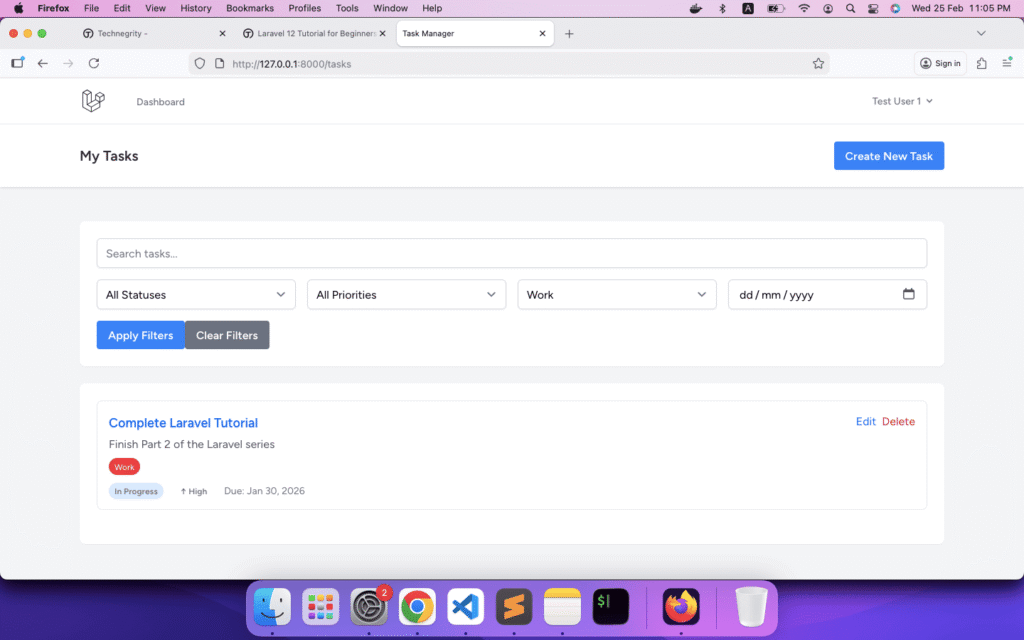
Step 6: Creating New Tasks (Create)
Now let’s implement the create functionality.
Implementing the Create Method
Update the create() method in TaskController.php:
public function create()
{
    $categories = auth()->user()->categories;

    return view('tasks.create', compact('categories'));
}
Creating the Form View
Create resources/views/tasks/create.blade.php:
<x-app-layout>
    <x-slot name="header">
        <h2 class="font-semibold text-xl text-gray-800 leading-tight">
            {{ __('Create New Task') }}
        </h2>
    </x-slot>

    <div class="py-12">
        <div class="max-w-3xl mx-auto sm:px-6 lg:px-8">
            <div class="bg-white overflow-hidden shadow-sm sm:rounded-lg">
                <div class="p-6">
                    <form method="POST" action="{{ route('tasks.store') }}" class="space-y-6">
                        @csrf

                        <!-- Title -->
                        <div>
                            <label for="title" class="block text-sm font-medium text-gray-700">
                                Title <span class="text-red-500">*</span>
                            </label>
                            <input type="text"
                                   name="title"
                                   id="title"
                                   value="{{ old('title') }}"
                                   required
                                   class="mt-1 block w-full rounded-md border-gray-300 shadow-sm focus:border-blue-500 focus:ring-blue-500 @error('title') border-red-500 @enderror">
                            @error('title')
                                <p class="mt-1 text-sm text-red-600">{{ $message }}</p>
                            @enderror
                        </div>

                        <!-- Description -->
                        <div>
                            <label for="description" class="block text-sm font-medium text-gray-700">
                                Description
                            </label>
                            <textarea name="description"
                                      id="description"
                                      rows="4"
                                      class="mt-1 block w-full rounded-md border-gray-300 shadow-sm focus:border-blue-500 focus:ring-blue-500 @error('description') border-red-500 @enderror">{{ old('description') }}</textarea>
                            @error('description')
                                <p class="mt-1 text-sm text-red-600">{{ $message }}</p>
                            @enderror
                        </div>

                        <!-- Priority -->
                        <div>
                            <label for="priority" class="block text-sm font-medium text-gray-700">
                                Priority <span class="text-red-500">*</span>
                            </label>
                            <select name="priority"
                                    id="priority"
                                    required
                                    class="mt-1 block w-full rounded-md border-gray-300 shadow-sm focus:border-blue-500 focus:ring-blue-500 @error('priority') border-red-500 @enderror">
                                <option value="low" {{ old('priority') == 'low' ? 'selected' : '' }}>Low</option>
                                <option value="medium" {{ old('priority', 'medium') == 'medium' ? 'selected' : '' }}>Medium</option>
                                <option value="high" {{ old('priority') == 'high' ? 'selected' : '' }}>High</option>
                            </select>
                            @error('priority')
                                <p class="mt-1 text-sm text-red-600">{{ $message }}</p>
                            @enderror
                        </div>

                        <!-- Status -->
                        <div>
                            <label for="status" class="block text-sm font-medium text-gray-700">
                                Status <span class="text-red-500">*</span>
                            </label>
                            <select name="status"
                                    id="status"
                                    required
                                    class="mt-1 block w-full rounded-md border-gray-300 shadow-sm focus:border-blue-500 focus:ring-blue-500 @error('status') border-red-500 @enderror">
                                <option value="pending" {{ old('status', 'pending') == 'pending' ? 'selected' : '' }}>Pending</option>
                                <option value="in_progress" {{ old('status') == 'in_progress' ? 'selected' : '' }}>In Progress</option>
                                <option value="completed" {{ old('status') == 'completed' ? 'selected' : '' }}>Completed</option>
                                <option value="archived" {{ old('status') == 'archived' ? 'selected' : '' }}>Archived</option>
                            </select>
                            @error('status')
                                <p class="mt-1 text-sm text-red-600">{{ $message }}</p>
                            @enderror
                        </div>

                        <!-- Due Date -->
                        <div>
                            <label for="due_date" class="block text-sm font-medium text-gray-700">
                                Due Date
                            </label>
                            <input type="date"
                                   name="due_date"
                                   id="due_date"
                                   value="{{ old('due_date') }}"
                                   min="{{ date('Y-m-d') }}"
                                   class="mt-1 block w-full rounded-md border-gray-300 shadow-sm focus:border-blue-500 focus:ring-blue-500 @error('due_date') border-red-500 @enderror">
                            @error('due_date')
                                <p class="mt-1 text-sm text-red-600">{{ $message }}</p>
                            @enderror
                        </div>

                        <!-- Categories (Multi-select) -->
                        <div>
                            <label for="categories" class="block text-sm font-medium text-gray-700">
                                Categories
                            </label>
                            <select name="categories[]"
                                    id="categories"
                                    multiple
                                    size="5"
                                    class="mt-1 block w-full rounded-md border-gray-300 shadow-sm focus:border-blue-500 focus:ring-blue-500 @error('categories') border-red-500 @enderror">
                                @foreach($categories as $category)
                                    <option value="{{ $category->id }}"
                                            {{ in_array($category->id, old('categories', [])) ? 'selected' : '' }}>
                                        {{ $category->name }}
                                    </option>
                                @endforeach
                            </select>
                            <p class="mt-1 text-sm text-gray-500">Hold Ctrl (Cmd on Mac) to select multiple categories</p>
                            @error('categories')
                                <p class="mt-1 text-sm text-red-600">{{ $message }}</p>
                            @enderror
                        </div>

                        <!-- Action Buttons -->
                        <div class="flex gap-4">
                            <button type="submit"
                                    class="bg-blue-500 hover:bg-blue-700 text-white font-bold py-2 px-4 rounded">
                                Create Task
                            </button>
                            <a href="{{ route('tasks.index') }}"
                               class="bg-gray-500 hover:bg-gray-700 text-white font-bold py-2 px-4 rounded inline-block">
                                Cancel
                            </a>
                        </div>
                    </form>
                </div>
            </div>
        </div>
    </div>
</x-app-layout>
Key Features:
-
@csrf– CSRF protection (required for all POST forms) -
old('field')– Preserves user input after validation errors -
@error('field')– Displays validation errors - Multi-select for categories with HTML5
multipleattribute - Date picker with
minattribute to prevent past dates
Step 7: Form Validation
Laravel provides powerful validation. Let’s create Form Request classes for better organization.
Creating Store Request Class
php artisan make:request StoreTaskRequestEdit app/Http/Requests/StoreTaskRequest.php:
<?php

namespace App\Http\Requests;

use Illuminate\Foundation\Http\FormRequest;

class StoreTaskRequest extends FormRequest
{
    /**
     * Determine if the user is authorized to make this request.
     */
    public function authorize(): bool
    {
        return true; // Authorization handled by middleware
    }

    /**
     * Get the validation rules that apply to the request.
     */
    public function rules(): array
    {
        return [
            'title' => ['required', 'string', 'max:255'],
            'description' => ['nullable', 'string', 'max:5000'],
            'priority' => ['required', 'in:low,medium,high'],
            'status' => ['required', 'in:pending,in_progress,completed,archived'],
            'due_date' => ['nullable', 'date', 'after_or_equal:today'],
            'categories' => ['nullable', 'array'],
            'categories.*' => ['exists:categories,id'],
        ];
    }

    /**
     * Get custom error messages.
     */
    public function messages(): array
    {
        return [
            'title.required' => 'Please enter a task title.',
            'title.max' => 'Task title cannot exceed 255 characters.',
            'priority.required' => 'Please select a priority level.',
            'priority.in' => 'Invalid priority selected.',
            'status.required' => 'Please select a status.',
            'status.in' => 'Invalid status selected.',
            'due_date.after_or_equal' => 'Due date cannot be in the past.',
            'categories.*.exists' => 'One or more selected categories are invalid.',
        ];
    }

    /**
     * Get custom attribute names.
     */
    public function attributes(): array
    {
        return [
            'due_date' => 'due date',
            'categories.*' => 'category',
        ];
    }
}
Understanding Validation Rules:
-
required– Field must be present and not empty -
string– Must be a string -
max:255– Maximum length -
nullable– Field is optional -
in:value1,value2– Must be one of the specified values -
date– Must be a valid date -
after_or_equal:today– Must be today or a future date -
array– Must be an array -
exists:table,column– Must exist in the database
Step 8: Storing Tasks (Store)
Now let’s implement the store() method to save tasks.
Update TaskController.php:
use App\Http\Requests\StoreTaskRequest;

public function store(StoreTaskRequest $request)
{
    // Create the task
    $task = auth()->user()->tasks()->create([
        'title' => $request->title,
        'description' => $request->description,
        'priority' => $request->priority,
        'status' => $request->status,
        'due_date' => $request->due_date,
    ]);

    // Attach categories if selected
    if ($request->filled('categories')) {
        $task->categories()->attach($request->categories);
    }

    // Flash success message
    return redirect()
        ->route('tasks.index')
        ->with('success', 'Task created successfully!');
}
What’s happening?
-
StoreTaskRequest $request– Automatically validates using our Form Request -
auth()->user()->tasks()->create()– Creates a task associated with the current user -
attach()– Attaches selected categories (many-to-many relationship) -
with('success', ...)– Flash message stored in session -
redirect()– Redirects back to the tasks list
Displaying Flash Messages
Add this to your layout after the header in resources/views/layouts/app.blade.php:
<!-- Flash Messages -->
@if (session('success'))
    <div class="max-w-7xl mx-auto sm:px-6 lg:px-8 mt-4">
        <div class="bg-green-100 border border-green-400 text-green-700 px-4 py-3 rounded relative" role="alert">
            <span class="block sm:inline">{{ session('success') }}</span>
        </div>
    </div>
@endif

@if (session('error'))
    <div class="max-w-7xl mx-auto sm:px-6 lg:px-8 mt-4">
        <div class="bg-red-100 border border-red-400 text-red-700 px-4 py-3 rounded relative" role="alert">
            <span class="block sm:inline">{{ session('error') }}</span>
        </div>
    </div>
@endif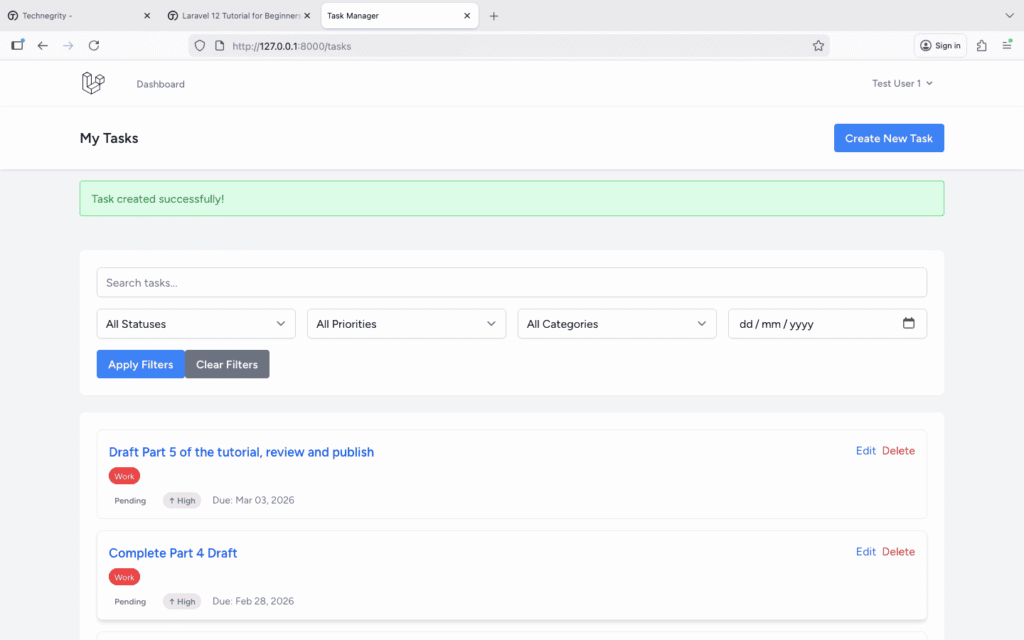
Step 9: Viewing Single Task (Show)
Let’s implement the task details page.
Update the show() method in TaskController.php:
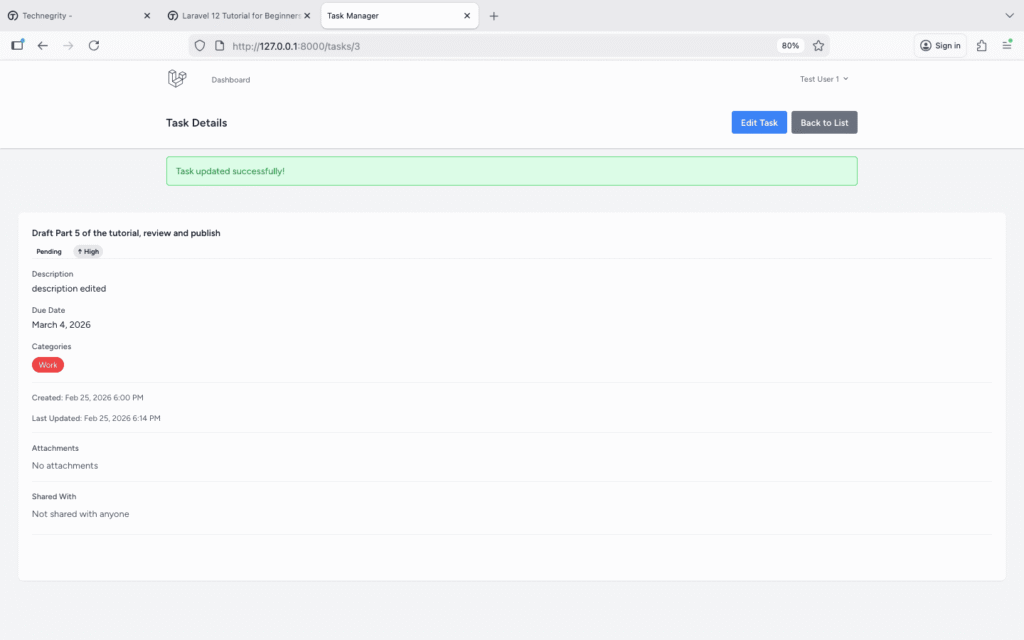
public function show(Task $task)
{
    // Load relationships
    $task->load(['categories', 'attachments', 'shares.sharedWith']);

    return view('tasks.show', compact('task'));
}
Create resources/views/tasks/show.blade.php:
<x-app-layout>
    <x-slot name="header">
        <div class="flex justify-between items-center">
            <h2 class="font-semibold text-xl text-gray-800 leading-tight">
                {{ __('Task Details') }}
            </h2>
            <div class="flex gap-2">
                <a href="{{ route('tasks.edit', $task) }}"
                   class="bg-blue-500 hover:bg-blue-700 text-white font-bold py-2 px-4 rounded">
                    Edit Task
                </a>
                <a href="{{ route('tasks.index') }}"
                   class="bg-gray-500 hover:bg-gray-700 text-white font-bold py-2 px-4 rounded">
                    Back to List
                </a>
            </div>
        </div>
    </x-slot>

    <div class="py-12">
        <div class="max-w-4xl mx-auto sm:px-6 lg:px-8">
            <div class="bg-white overflow-hidden shadow-sm sm:rounded-lg">
                <div class="p-6">
                    <!-- Task Header -->
                    <div class="border-b pb-4 mb-4">
                        <h1 class="text-2xl font-bold text-gray-900 mb-2">
                            {{ $task->title }}
                        </h1>

                        <div class="flex gap-3">
                            <x-status-badge :status="$task->status" />
                            <x-priority-indicator :priority="$task->priority" />
                        </div>
                    </div>

                    <!-- Task Details -->
                    <div class="space-y-4">
                        <!-- Description -->
                        @if($task->description)
                            <div>
                                <h3 class="text-sm font-medium text-gray-700 mb-1">Description</h3>
                                <p class="text-gray-900 whitespace-pre-wrap">{{ $task->description }}</p>
                            </div>
                        @endif

                        <!-- Due Date -->
                        @if($task->due_date)
                            <div>
                                <h3 class="text-sm font-medium text-gray-700 mb-1">Due Date</h3>
                                <p class="text-gray-900">
                                    {{ $task->due_date->format('F j, Y') }}
                                    @if($task->due_date->isPast() && $task->status !== 'completed')
                                        <span class="ml-2 text-red-600 font-semibold">Overdue!</span>
                                    @endif
                                </p>
                            </div>
                        @endif

                        <!-- Categories -->
                        @if($task->categories->count() > 0)
                            <div>
                                <h3 class="text-sm font-medium text-gray-700 mb-2">Categories</h3>
                                <div class="flex flex-wrap gap-2">
                                    @foreach($task->categories as $category)
                                        <span class="px-3 py-1 text-sm rounded-full text-white"
                                              style="background-color: {{ $category->color }}">
                                            {{ $category->name }}
                                        </span>
                                    @endforeach
                                </div>
                            </div>
                        @endif

                        <!-- Timestamps -->
                        <div class="border-t pt-4 mt-4">
                            <div class="grid grid-cols-2 gap-4 text-sm text-gray-600">
                                <div>
                                    <span class="font-medium">Created:</span>
                                    {{ $task->created_at->format('M d, Y g:i A') }}
                                </div>
                                <div>
                                    <span class="font-medium">Last Updated:</span>
                                    {{ $task->updated_at->format('M d, Y g:i A') }}
                                </div>
                            </div>
                        </div>

                        <!-- Attachments Placeholder -->
                        <div class="border-t pt-4 mt-4">
                            <h3 class="text-sm font-medium text-gray-700 mb-2">Attachments</h3>
                            @if($task->attachments->count() > 0)
                                <p class="text-gray-600">{{ $task->attachments->count() }} attachment(s)</p>
                                <p class="text-sm text-gray-500 mt-1">Full attachment management coming in Part 5!</p>
                            @else
                                <p class="text-gray-600">No attachments</p>
                            @endif
                        </div>

                        <!-- Sharing Placeholder -->
                        <div class="border-t pt-4 mt-4">
                            <h3 class="text-sm font-medium text-gray-700 mb-2">Shared With</h3>
                            @if($task->shares->count() > 0)
                                <p class="text-gray-600">Shared with {{ $task->shares->count() }} user(s)</p>
                                <p class="text-sm text-gray-500 mt-1">Full sharing management coming in Part 5!</p>
                            @else
                                <p class="text-gray-600">Not shared with anyone</p>
                            @endif
                        </div>
                    </div>

                    <!-- Delete Button -->
                    <div class="border-t pt-4 mt-6">
                        <form method="POST"
                              action="{{ route('tasks.destroy', $task) }}"
                              onsubmit="return confirm('Are you sure you want to delete this task? This action cannot be undone.');">
                            @csrf
                            @method('DELETE')
                            <button type="submit"
                                    class="bg-red-500 hover:bg-red-700 text-white font-bold py-2 px-4 rounded">
                                Delete Task
                            </button>
                        </form>
                    </div>
                </div>
            </div>
        </div>
    </div>
</x-app-layout>
Step 10: Editing Tasks (Edit)
Now let’s implement the edit functionality.
Update the edit() method in TaskController.php:
public function edit(Task $task)
{
    $categories = auth()->user()->categories;

    return view('tasks.edit', compact('task', 'categories'));
}
Create resources/views/tasks/edit.blade.php:
<x-app-layout>
    <x-slot name="header">
        <h2 class="font-semibold text-xl text-gray-800 leading-tight">
            {{ __('Edit Task') }}
        </h2>
    </x-slot>

    <div class="py-12">
        <div class="max-w-3xl mx-auto sm:px-6 lg:px-8">
            <div class="bg-white overflow-hidden shadow-sm sm:rounded-lg">
                <div class="p-6">
                    <form method="POST" action="{{ route('tasks.update', $task) }}" class="space-y-6">
                        @csrf
                        @method('PUT')

                        <!-- Title -->
                        <div>
                            <label for="title" class="block text-sm font-medium text-gray-700">
                                Title <span class="text-red-500">*</span>
                            </label>
                            <input type="text"
                                   name="title"
                                   id="title"
                                   value="{{ old('title', $task->title) }}"
                                   required
                                   class="mt-1 block w-full rounded-md border-gray-300 shadow-sm focus:border-blue-500 focus:ring-blue-500 @error('title') border-red-500 @enderror">
                            @error('title')
                                <p class="mt-1 text-sm text-red-600">{{ $message }}</p>
                            @enderror
                        </div>

                        <!-- Description -->
                        <div>
                            <label for="description" class="block text-sm font-medium text-gray-700">
                                Description
                            </label>
                            <textarea name="description"
                                      id="description"
                                      rows="4"
                                      class="mt-1 block w-full rounded-md border-gray-300 shadow-sm focus:border-blue-500 focus:ring-blue-500 @error('description') border-red-500 @enderror">{{ old('description', $task->description) }}</textarea>
                            @error('description')
                                <p class="mt-1 text-sm text-red-600">{{ $message }}</p>
                            @enderror
                        </div>

                        <!-- Priority -->
                        <div>
                            <label for="priority" class="block text-sm font-medium text-gray-700">
                                Priority <span class="text-red-500">*</span>
                            </label>
                            <select name="priority"
                                    id="priority"
                                    required
                                    class="mt-1 block w-full rounded-md border-gray-300 shadow-sm focus:border-blue-500 focus:ring-blue-500 @error('priority') border-red-500 @enderror">
                                <option value="low" {{ old('priority', $task->priority) == 'low' ? 'selected' : '' }}>Low</option>
                                <option value="medium" {{ old('priority', $task->priority) == 'medium' ? 'selected' : '' }}>Medium</option>
                                <option value="high" {{ old('priority', $task->priority) == 'high' ? 'selected' : '' }}>High</option>
                            </select>
                            @error('priority')
                                <p class="mt-1 text-sm text-red-600">{{ $message }}</p>
                            @enderror
                        </div>

                        <!-- Status -->
                        <div>
                            <label for="status" class="block text-sm font-medium text-gray-700">
                                Status <span class="text-red-500">*</span>
                            </label>
                            <select name="status"
                                    id="status"
                                    required
                                    class="mt-1 block w-full rounded-md border-gray-300 shadow-sm focus:border-blue-500 focus:ring-blue-500 @error('status') border-red-500 @enderror">
                                <option value="pending" {{ old('status', $task->status) == 'pending' ? 'selected' : '' }}>Pending</option>
                                <option value="in_progress" {{ old('status', $task->status) == 'in_progress' ? 'selected' : '' }}>In Progress</option>
                                <option value="completed" {{ old('status', $task->status) == 'completed' ? 'selected' : '' }}>Completed</option>
                                <option value="archived" {{ old('status', $task->status) == 'archived' ? 'selected' : '' }}>Archived</option>
                            </select>
                            @error('status')
                                <p class="mt-1 text-sm text-red-600">{{ $message }}</p>
                            @enderror
                        </div>

                        <!-- Due Date -->
                        <div>
                            <label for="due_date" class="block text-sm font-medium text-gray-700">
                                Due Date
                            </label>
                            <input type="date"
                                   name="due_date"
                                   id="due_date"
                                   value="{{ old('due_date', $task->due_date?->format('Y-m-d')) }}"
                                   class="mt-1 block w-full rounded-md border-gray-300 shadow-sm focus:border-blue-500 focus:ring-blue-500 @error('due_date') border-red-500 @enderror">
                            @error('due_date')
                                <p class="mt-1 text-sm text-red-600">{{ $message }}</p>
                            @enderror
                        </div>

                        <!-- Categories -->
                        <div>
                            <label for="categories" class="block text-sm font-medium text-gray-700">
                                Categories
                            </label>
                            <select name="categories[]"
                                    id="categories"
                                    multiple
                                    size="5"
                                    class="mt-1 block w-full rounded-md border-gray-300 shadow-sm focus:border-blue-500 focus:ring-blue-500 @error('categories') border-red-500 @enderror">
                                @foreach($categories as $category)
                                    <option value="{{ $category->id }}"
                                            {{ in_array($category->id, old('categories', $task->categories->pluck('id')->toArray())) ? 'selected' : '' }}>
                                        {{ $category->name }}
                                    </option>
                                @endforeach
                            </select>
                            <p class="mt-1 text-sm text-gray-500">Hold Ctrl (Cmd on Mac) to select multiple categories</p>
                            @error('categories')
                                <p class="mt-1 text-sm text-red-600">{{ $message }}</p>
                            @enderror
                        </div>

                        <!-- Action Buttons -->
                        <div class="flex gap-4">
                            <button type="submit"
                                    class="bg-blue-500 hover:bg-blue-700 text-white font-bold py-2 px-4 rounded">
                                Update Task
                            </button>
                            <a href="{{ route('tasks.show', $task) }}"
                               class="bg-gray-500 hover:bg-gray-700 text-white font-bold py-2 px-4 rounded inline-block">
                                Cancel
                            </a>
                        </div>
                    </form>
                </div>
            </div>
        </div>
    </div>
</x-app-layout>
Key Differences from Create Form:
- Uses
@method('PUT')for update request - Pre-populates fields with
old('field', $task->field) - Categories pre-selected using
$task->categories->pluck('id')->toArray() - Form action points to
tasks.updateroute
Step 11: Updating Tasks (Update)
Let’s implement the update logic.
First, create the Update Request:
php artisan make:request UpdateTaskRequestEdit app/Http/Requests/UpdateTaskRequest.php:
<?php

namespace App\Http\Requests;

use Illuminate\Foundation\Http\FormRequest;

class UpdateTaskRequest extends FormRequest
{
    public function authorize(): bool
    {
        return true;
    }

    public function rules(): array
    {
        return [
            'title' => ['required', 'string', 'max:255'],
            'description' => ['nullable', 'string', 'max:5000'],
            'priority' => ['required', 'in:low,medium,high'],
            'status' => ['required', 'in:pending,in_progress,completed,archived'],
            'due_date' => ['nullable', 'date'],
            'categories' => ['nullable', 'array'],
            'categories.*' => ['exists:categories,id'],
        ];
    }

    public function messages(): array
    {
        return [
            'title.required' => 'Please enter a task title.',
            'title.max' => 'Task title cannot exceed 255 characters.',
            'priority.required' => 'Please select a priority level.',
            'status.required' => 'Please select a status.',
            'categories.*.exists' => 'One or more selected categories are invalid.',
        ];
    }
}
Update the update() method in TaskController.php:
use App\Http\Requests\UpdateTaskRequest;

public function update(UpdateTaskRequest $request, Task $task)
{
    // Update task
    $task->update([
        'title' => $request->title,
        'description' => $request->description,
        'priority' => $request->priority,
        'status' => $request->status,
        'due_date' => $request->due_date,
    ]);

    // Sync categories (removes old, adds new)
    if ($request->has('categories')) {
        $task->categories()->sync($request->categories);
    } else {
        // If no categories selected, remove all
        $task->categories()->detach();
    }

    return redirect()
        ->route('tasks.show', $task)
        ->with('success', 'Task updated successfully!');
}
Understanding sync():
-
attach()– Adds relationships (keeps existing) -
detach()– Removes relationships -
sync()– Replaces all relationships with new set (perfect for updates)
Step 12: Deleting Tasks (Destroy)
Now let’s implement soft deletes for tasks.
Adding Soft Deletes to the Task Model
First, add the SoftDeletes trait to the Task model.
Edit app/Models/Task.php:
<?php

namespace App\Models;

use Illuminate\Database\Eloquent\Factories\HasFactory;
use Illuminate\Database\Eloquent\Model;
use Illuminate\Database\Eloquent\SoftDeletes;
use Illuminate\Database\Eloquent\Relations\BelongsTo;
use Illuminate\Database\Eloquent\Relations\BelongsToMany;
use Illuminate\Database\Eloquent\Relations\HasMany;

class Task extends Model
{
    use HasFactory, SoftDeletes;

    protected $fillable = [
        'user_id',
        'title',
        'description',
        'priority',
        'status',
        'due_date',
    ];

    protected $casts = [
        'due_date' => 'date',
        'deleted_at' => 'datetime',
    ];

    // ... rest of the model code
}
Create Migration for Soft Deletes
php artisan make:migration add_soft_deletes_to_tasks_tableEdit the migration file:
<?php

use Illuminate\Database\Migrations\Migration;
use Illuminate\Database\Schema\Blueprint;
use Illuminate\Support\Facades\Schema;

return new class extends Migration
{
    public function up(): void
    {
        Schema::table('tasks', function (Blueprint $table) {
            $table->softDeletes();
        });
    }

    public function down(): void
    {
        Schema::table('tasks', function (Blueprint $table) {
            $table->dropSoftDeletes();
        });
    }
};
Run the migration:
php artisan migrate
Implementing the Destroy Method
Update the destroy() method in TaskController.php:
public function destroy(Task $task)
{
    $task->delete(); // Soft delete

    return redirect()
        ->route('tasks.index')
        ->with('success', 'Task deleted successfully!');
}
What is Soft Delete?
- Task isn’t actually deleted from the database
-
deleted_atcolumn is set to the current timestamp - Soft-deleted tasks are excluded from queries automatically
- Can be restored later
Viewing Deleted Tasks
Add a method to view trashed tasks:
public function trashed()
{
    $tasks = auth()->user()->tasks()->onlyTrashed()->paginate(10);

    return view('tasks.trashed', compact('tasks'));
}
Add route in routes/web.php:
Route::get('/tasks/trashed', [TaskController::class, 'trashed'])->name('tasks.trashed');Restoring Deleted Tasks
Add restore method:
public function restore($id)
{
    $task = auth()->user()->tasks()->onlyTrashed()->findOrFail($id);
    $task->restore();

    return redirect()
        ->route('tasks.index')
        ->with('success', 'Task restored successfully!');
}
Add route:
Route::post('/tasks/{id}/restore', [TaskController::class, 'restore'])->name('tasks.restore');Permanent Delete
Add force delete method:
public function forceDestroy($id)
{
    $task = auth()->user()->tasks()->onlyTrashed()->findOrFail($id);
    $task->forceDelete(); // Permanent delete

    return redirect()
        ->route('tasks.trashed')
        ->with('success', 'Task permanently deleted!');
}
Step 13: Task Status Management
Let’s add quick status update functionality.
Add a method to update just the status:
public function updateStatus(Request $request, Task $task)
{
    $request->validate([
        'status' => ['required', 'in:pending,in_progress,completed,archived'],
    ]);

    $task->update(['status' => $request->status]);

    return redirect()
        ->back()
        ->with('success', 'Task status updated!');
}
Add route:
Route::patch('/tasks/{task}/status', [TaskController::class, 'updateStatus'])->name('tasks.updateStatus');Add quick status buttons to your task cards in index.blade.php:
<!-- Quick Status Update -->
<div class="mt-3 flex gap-2">
    <form method="POST" action="{{ route('tasks.updateStatus', $task) }}" class="inline">
        @csrf
        @method('PATCH')
        <input type="hidden" name="status" value="in_progress">
        <button type="submit"
                class="text-xs bg-blue-500 hover:bg-blue-600 text-white px-2 py-1 rounded"
                {{ $task->status == 'in_progress' ? 'disabled' : '' }}>
            In Progress
        </button>
    </form>

    <form method="POST" action="{{ route('tasks.updateStatus', $task) }}" class="inline">
        @csrf
        @method('PATCH')
        <input type="hidden" name="status" value="completed">
        <button type="submit"
                class="text-xs bg-green-500 hover:bg-green-600 text-white px-2 py-1 rounded"
                {{ $task->status == 'completed' ? 'disabled' : '' }}>
            Complete
        </button>
    </form>
</div>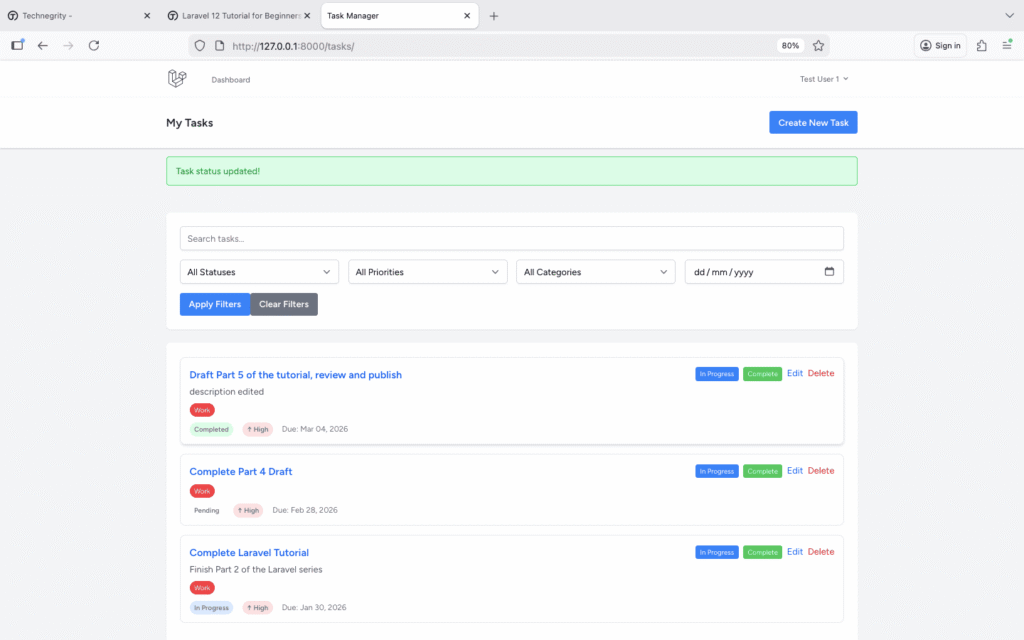
Step 14: Performance Optimization
Let’s optimize our queries to prevent the N+1 problem.
Understanding the N+1 Problem
// BAD - N+1 queries
$tasks = Task::all(); // 1 query
foreach ($tasks as $task) {
    echo $task->user->name; // N queries (one per task)
    echo $task->categories->count(); // N more queries
}
// Total: 1 + N + N queries
// GOOD - 3 queries total
$tasks = Task::with(['user', 'categories'])->get(); // 3 queries total
foreach ($tasks as $task) {
    echo $task->user->name; // No additional query
    echo $task->categories->count(); // No additional query
}
Optimizing the Index Method
Update your index() method with proper eager loading:
public function index(Request $request)
{
    $query = auth()->user()->tasks()
        ->with(['categories']) // Eager load categories
        ->withCount('attachments'); // Get count without loading all data

    // ... rest of the filtering code

    $tasks = $query->paginate(10)->withQueryString();

    return view('tasks.index', compact('tasks', 'categories'));
}
Using Query Scopes
Add useful scopes to your Task model:
public function scopeCompleted($query)
{
    return $query->where('status', 'completed');
}

public function scopePending($query)
{
    return $query->where('status', 'pending');
}

public function scopeDueToday($query)
{
    return $query->whereDate('due_date', today());
}

public function scopeDueSoon($query)
{
    return $query->whereBetween('due_date', [today(), today()->addDays(7)]);
}

public function scopeHighPriority($query)
{
    return $query->where('priority', 'high');
}
Usage:
// Get high priority tasks due soon
$urgentTasks = Task::highPriority()->dueSoon()->get();

// Get completed tasks
$completedTasks = Task::completed()->latest()->get();
Pagination Best Practices
// Use cursor pagination for better performance on large datasets
$tasks = Task::latest()->cursorPaginate(15);

// Or use simple pagination when you don't need page numbers
$tasks = Task::latest()->simplePaginate(15);
Step 15: Working with Layouts and Navigation
Let’s improve our layout with proper navigation and breadcrumbs.
Adding Tasks to Navigation
Edit resources/views/layouts/navigation.blade.php to add tasks link:
<!-- Navigation Links -->
<div class="hidden space-x-8 sm:-my-px sm:ml-10 sm:flex">
    <x-nav-link :href="route('dashboard')" :active="request()->routeIs('dashboard')">
        {{ __('Dashboard') }}
    </x-nav-link>

    <x-nav-link :href="route('tasks.index')" :active="request()->routeIs('tasks.*')">
        {{ __('Tasks') }}
    </x-nav-link>
</div>
Creating Breadcrumbs Component
Create resources/views/components/breadcrumbs.blade.php:
@props(['items'])

<nav class="flex mb-4" aria-label="Breadcrumb">
    <ol class="inline-flex items-center space-x-1 md:space-x-3">
        <li class="inline-flex items-center">
            <a href="{{ route('dashboard') }}"
               class="text-gray-700 hover:text-gray-900 inline-flex items-center">
                <svg class="w-4 h-4 mr-2" fill="currentColor" viewBox="0 0 20 20">
                    <path d="M10.707 2.293a1 1 0 00-1.414 0l-7 7a1 1 0 001.414 1.414L4 10.414V17a1 1 0 001 1h2a1 1 0 001-1v-2a1 1 0 011-1h2a1 1 0 011 1v2a1 1 0 001 1h2a1 1 0 001-1v-6.586l.293.293a1 1 0 001.414-1.414l-7-7z"></path>
                </svg>
                Home
            </a>
        </li>

        @foreach($items as $item)
            <li>
                <div class="flex items-center">
                    <svg class="w-6 h-6 text-gray-400" fill="currentColor" viewBox="0 0 20 20">
                        <path fill-rule="evenodd" d="M7.293 14.707a1 1 0 010-1.414L10.586 10 7.293 6.707a1 1 0 011.414-1.414l4 4a1 1 0 010 1.414l-4 4a1 1 0 01-1.414 0z" clip-rule="evenodd"></path>
                    </svg>
                    @if(isset($item['url']))
                        <a href="{{ $item['url'] }}"
                           class="ml-1 text-gray-700 hover:text-gray-900 md:ml-2">
                            {{ $item['label'] }}
                        </a>
                    @else
                        <span class="ml-1 text-gray-500 md:ml-2">{{ $item['label'] }}</span>
                    @endif
                </div>
            </li>
        @endforeach
    </ol>
</nav>
Using Breadcrumbs
In your task views, add breadcrumbs:
<!-- In tasks/show.blade.php -->
<x-breadcrumbs :items="[
    ['label' => 'Tasks', 'url' => route('tasks.index')],
    ['label' => $task->title]
]" />

<!-- In tasks/create.blade.php -->
<x-breadcrumbs :items="[
    ['label' => 'Tasks', 'url' => route('tasks.index')],
    ['label' => 'Create New Task']
]" />
Step 16: User Experience Enhancements
Let’s add some UX improvements.
Loading States
Add a simple loading indicator. Create resources/views/components/loading.blade.php:
<div id="loading" class="hidden fixed top-0 left-0 w-full h-full bg-black bg-opacity-50 z-50 flex items-center justify-center">
    <div class="bg-white p-6 rounded-lg shadow-xl">
        <div class="animate-spin rounded-full h-12 w-12 border-b-2 border-blue-500 mx-auto"></div>
        <p class="mt-4 text-gray-700">Loading...</p>
    </div>
</div>

<script>
    // Show loading on form submit
    document.querySelectorAll('form').forEach(form => {
        form.addEventListener('submit', function() {
            document.getElementById('loading').classList.remove('hidden');
        });
    });
</script>
Include it in your layout:
<!-- In layouts/app.blade.php, before closing body tag -->
<x-loading />
Confirmation Modals
Improve delete confirmations with a reusable modal. Create resources/views/components/confirm-modal.blade.php:
@props(['title' => 'Confirm Action', 'message' => 'Are you sure?', 'action'])

<div x-data="{ open: false }" x-cloak>
    <!-- Trigger -->
    <button @click="open = true" {{ $attributes->merge(['class' => 'text-red-600 hover:text-red-800']) }}>
        {{ $slot }}
    </button>

    <!-- Modal -->
    <div x-show="open"
         class="fixed inset-0 z-50 overflow-y-auto"
         aria-labelledby="modal-title"
         role="dialog"
         aria-modal="true">
        <div class="flex items-end justify-center min-h-screen pt-4 px-4 pb-20 text-center sm:block sm:p-0">
            <!-- Background overlay -->
            <div x-show="open"
                 x-transition:enter="ease-out duration-300"
                 x-transition:enter-start="opacity-0"
                 x-transition:enter-end="opacity-100"
                 x-transition:leave="ease-in duration-200"
                 x-transition:leave-start="opacity-100"
                 x-transition:leave-end="opacity-0"
                 class="fixed inset-0 bg-gray-500 bg-opacity-75 transition-opacity"
                 @click="open = false"></div>

            <!-- Modal panel -->
            <div x-show="open"
                 x-transition:enter="ease-out duration-300"
                 x-transition:enter-start="opacity-0 translate-y-4 sm:translate-y-0 sm:scale-95"
                 x-transition:enter-end="opacity-100 translate-y-0 sm:scale-100"
                 x-transition:leave="ease-in duration-200"
                 x-transition:leave-start="opacity-100 translate-y-0 sm:scale-100"
                 x-transition:leave-end="opacity-0 translate-y-4 sm:translate-y-0 sm:scale-95"
                 class="inline-block align-bottom bg-white rounded-lg text-left overflow-hidden shadow-xl transform transition-all sm:my-8 sm:align-middle sm:max-w-lg sm:w-full">
                <div class="bg-white px-4 pt-5 pb-4 sm:p-6 sm:pb-4">
                    <div class="sm:flex sm:items-start">
                        <div class="mx-auto flex-shrink-0 flex items-center justify-center h-12 w-12 rounded-full bg-red-100 sm:mx-0 sm:h-10 sm:w-10">
                            <svg class="h-6 w-6 text-red-600" fill="none" viewBox="0 0 24 24" stroke="currentColor">
                                <path stroke-linecap="round" stroke-linejoin="round" stroke-width="2" d="M12 9v2m0 4h.01m-6.938 4h13.856c1.54 0 2.502-1.667 1.732-3L13.732 4c-.77-1.333-2.694-1.333-3.464 0L3.34 16c-.77 1.333.192 3 1.732 3z" />
                            </svg>
                        </div>
                        <div class="mt-3 text-center sm:mt-0 sm:ml-4 sm:text-left">
                            <h3 class="text-lg leading-6 font-medium text-gray-900" id="modal-title">
                                {{ $title }}
                            </h3>
                            <div class="mt-2">
                                <p class="text-sm text-gray-500">
                                    {{ $message }}
                                </p>
                            </div>
                        </div>
                    </div>
                </div>
                <div class="bg-gray-50 px-4 py-3 sm:px-6 sm:flex sm:flex-row-reverse">
                    <form action="{{ $action }}" method="POST" class="inline">
                        @csrf
                        @method('DELETE')
                        <button type="submit"
                                class="w-full inline-flex justify-center rounded-md border border-transparent shadow-sm px-4 py-2 bg-red-600 text-base font-medium text-white hover:bg-red-700 focus:outline-none sm:ml-3 sm:w-auto sm:text-sm">
                            Delete
                        </button>
                    </form>
                    <button type="button"
                            @click="open = false"
                            class="mt-3 w-full inline-flex justify-center rounded-md border border-gray-300 shadow-sm px-4 py-2 bg-white text-base font-medium text-gray-700 hover:bg-gray-50 focus:outline-none sm:mt-0 sm:ml-3 sm:w-auto sm:text-sm">
                        Cancel
                    </button>
                </div>
            </div>
        </div>
    </div>
</div>
Usage:
<x-confirm-modal
    title="Delete Task"
    message="Are you sure you want to delete this task? This action cannot be undone."
    :action="route('tasks.destroy', $task)">
    Delete
</x-confirm-modal>
Toast Notifications
Add auto-dismissing toast notifications. Create resources/views/components/toast.blade.php:
@if (session('success') || session('error') || session('warning'))
    <div x-data="{ show: true }"
         x-show="show"
         x-init="setTimeout(() => show = false, 5000)"
         x-transition:enter="transform ease-out duration-300 transition"
         x-transition:enter-start="translate-y-2 opacity-0 sm:translate-y-0 sm:translate-x-2"
         x-transition:enter-end="translate-y-0 opacity-100 sm:translate-x-0"
         x-transition:leave="transition ease-in duration-100"
         x-transition:leave-start="opacity-100"
         x-transition:leave-end="opacity-0"
         class="fixed top-4 right-4 z-50 max-w-sm w-full">

        @if(session('success'))
            <div class="bg-green-50 border-l-4 border-green-400 p-4 rounded shadow-lg">
                <div class="flex">
                    <div class="flex-shrink-0">
                        <svg class="h-5 w-5 text-green-400" viewBox="0 0 20 20" fill="currentColor">
                            <path fill-rule="evenodd" d="M10 18a8 8 0 100-16 8 8 0 000 16zm3.707-9.293a1 1 0 00-1.414-1.414L9 10.586 7.707 9.293a1 1 0 00-1.414 1.414l2 2a1 1 0 001.414 0l4-4z" clip-rule="evenodd" />
                        </svg>
                    </div>
                    <div class="ml-3">
                        <p class="text-sm font-medium text-green-800">{{ session('success') }}</p>
                    </div>
                    <div class="ml-auto pl-3">
                        <button @click="show = false" class="text-green-400 hover:text-green-600">
                            <svg class="h-5 w-5" viewBox="0 0 20 20" fill="currentColor">
                                <path fill-rule="evenodd" d="M4.293 4.293a1 1 0 011.414 0L10 8.586l4.293-4.293a1 1 0 111.414 1.414L11.414 10l4.293 4.293a1 1 0 01-1.414 1.414L10 11.414l-4.293 4.293a1 1 0 01-1.414-1.414L8.586 10 4.293 5.707a1 1 0 010-1.414z" clip-rule="evenodd" />
                            </svg>
                        </button>
                    </div>
                </div>
            </div>
        @endif

        @if(session('error'))
            <div class="bg-red-50 border-l-4 border-red-400 p-4 rounded shadow-lg">
                <div class="flex">
                    <div class="flex-shrink-0">
                        <svg class="h-5 w-5 text-red-400" viewBox="0 0 20 20" fill="currentColor">
                            <path fill-rule="evenodd" d="M10 18a8 8 0 100-16 8 8 0 000 16zM8.707 7.293a1 1 0 00-1.414 1.414L8.586 10l-1.293 1.293a1 1 0 101.414 1.414L10 11.414l1.293 1.293a1 1 0 001.414-1.414L11.414 10l1.293-1.293a1 1 0 00-1.414-1.414L10 8.586 8.707 7.293z" clip-rule="evenodd" />
                        </svg>
                    </div>
                    <div class="ml-3">
                        <p class="text-sm font-medium text-red-800">{{ session('error') }}</p>
                    </div>
                    <div class="ml-auto pl-3">
                        <button @click="show = false" class="text-red-400 hover:text-red-600">
                            <svg class="h-5 w-5" viewBox="0 0 20 20" fill="currentColor">
                                <path fill-rule="evenodd" d="M4.293 4.293a1 1 0 011.414 0L10 8.586l4.293-4.293a1 1 0 111.414 1.414L11.414 10l4.293 4.293a1 1 0 01-1.414 1.414L10 11.414l-4.293 4.293a1 1 0 01-1.414-1.414L8.586 10 4.293 5.707a1 1 0 010-1.414z" clip-rule="evenodd" />
                            </svg>
                        </button>
                    </div>
                </div>
            </div>
        @endif
    </div>
@endif
Add to your layout:
<!-- In layouts/app.blade.php, before closing body tag -->
<x-toast />
Step 17: Best Practices & Code Organization
Let’s explore some advanced patterns for cleaner code.
Using Service Classes (Optional)
For complex business logic, consider service classes. Create app/Services/TaskService.php:
<?php

namespace App\Services;

use App\Models\Task;
use App\Models\User;
use Illuminate\Support\Facades\DB;

class TaskService
{
    /**
     * Create a new task with categories.
     */
    public function createTask(User $user, array $data): Task
    {
        return DB::transaction(function () use ($user, $data) {
            // Create task
            $task = $user->tasks()->create([
                'title' => $data['title'],
                'description' => $data['description'] ?? null,
                'priority' => $data['priority'],
                'status' => $data['status'],
                'due_date' => $data['due_date'] ?? null,
            ]);

            // Attach categories
            if (!empty($data['categories'])) {
                $task->categories()->attach($data['categories']);
            }

            // Future: Send notifications, log activity, etc.

            return $task;
        });
    }

    /**
     * Update task with categories.
     */
    public function updateTask(Task $task, array $data): Task
    {
        return DB::transaction(function () use ($task, $data) {
            // Update task
            $task->update([
                'title' => $data['title'],
                'description' => $data['description'] ?? null,
                'priority' => $data['priority'],
                'status' => $data['status'],
                'due_date' => $data['due_date'] ?? null,
            ]);

            // Sync categories
            if (isset($data['categories'])) {
                $task->categories()->sync($data['categories']);
            } else {
                $task->categories()->detach();
            }

            return $task;
        });
    }

    /**
     * Get user's tasks with filters.
     */
    public function getUserTasks(User $user, array $filters = [])
    {
        $query = $user->tasks()->with('categories');

        if (!empty($filters['search'])) {
            $query->where(function($q) use ($filters) {
                $q->where('title', 'like', '%' . $filters['search'] . '%')
                  ->orWhere('description', 'like', '%' . $filters['search'] . '%');
            });
        }

        if (!empty($filters['status'])) {
            $query->where('status', $filters['status']);
        }

        if (!empty($filters['priority'])) {
            $query->where('priority', $filters['priority']);
        }

        return $query->orderBy('created_at', 'desc')->paginate(10);
    }
}
Using the service in your controller:
use App\Services\TaskService;

class TaskController extends Controller
{
    public function __construct(
        protected TaskService $taskService
    ) {
        $this->middleware('auth');
        $this->middleware('task.owner')->only(['show', 'edit', 'update', 'destroy']);
    }

    public function store(StoreTaskRequest $request)
    {
        $task = $this->taskService->createTask(
            auth()->user(),
            $request->validated()
        );

        return redirect()
            ->route('tasks.show', $task)
            ->with('success', 'Task created successfully!');
    }
}
Request Classes for Validation
We’ve already used Form Request classes, which is a best practice:
Benefits:
- Keeps controllers thin
- Reusable validation logic
- Centralized authorization
- Easy to test
Repository Pattern (Advanced – Optional)
For very complex applications, consider the Repository pattern:
// app/Repositories/TaskRepository.php
class TaskRepository
{
    public function findByUser(User $user, array $filters = [])
    {
        // Complex query logic
    }

    public function create(array $data): Task
    {
        // Creation logic
    }
}
Note: For most Laravel applications, Eloquent models are sufficient. Use repositories only when you have complex data access patterns.
Step 18: Testing Your CRUD Operations
Let’s create a comprehensive testing checklist.
Manual Testing Checklist
Create Task Testing:
- Can create task with all fields
- Can create task with minimal fields (only required)
- Validation errors show for invalid data
- Can select multiple categories
- Can’t select past due dates
- Redirects to correct page after creation
- Success message displays
Read/List Tasks Testing:
- Can see all my tasks
- Can’t see other users’ tasks
- Pagination works correctly
- Search finds tasks by title
- Search finds tasks by description
- Status filter works
- Priority filter works
- Category filter works
- Multiple filters work together
- Clear filters button resets everything
- Empty state shows when no tasks
Update Task Testing:
- Edit form pre-populates with existing data
- Can update all fields
- Can change categories
- Can remove all categories
- Validation works on update
- Changes save correctly
- Redirects to correct page
- Success message displays
Delete Task Testing:
- Delete button shows confirmation
- Task soft deletes (not permanently removed)
- Can view trashed tasks
- Can restore deleted tasks
- Can permanently delete tasks
- Success message displays
Authorization Testing:
- Can’t access other users’ tasks via URL
- Can’t edit other users’ tasks
- Can’t delete other users’ tasks
- 403 error shows for unauthorized access
Performance Testing:
- No N+1 query problems
- Page loads quickly with many tasks
- Filters don’t cause slowdowns
Common Issues and Solutions
Issue 1: Categories not saving
// Solution: Make sure you're using attach/sync, not direct assignment
$task->categories()->attach($categoryIds); // Correct
$task->categories = $categoryIds; // Wrong
Issue 2: Old input not persisting after validation errors
<!-- Solution: Always use old() helper -->
<input value="{{ old('title', $task->title ?? '') }}">
Issue 3: Validation passes but data not saving
// Solution: Add fields to $fillable array in model
protected $fillable = ['title', 'description', 'priority', 'status', 'due_date'];
Issue 4: Middleware blocking all requests
// Solution: Check middleware is applied correctly
$this->middleware('task.owner')->only(['show', 'edit', 'update', 'destroy']);
// Don't apply to 'index' or 'create'
What We’ve Accomplished
Congratulations! You’ve built a complete CRUD application with advanced features:
- RESTful routing with resource controllers
- Custom middleware for authorization
- Complete CRUD operations (Create, Read, Update, Delete)
- Form validation with custom Request classes
- Search and filtering functionality
- Pagination with query string preservation
- Soft deletes with restore capability
- Reusable Blade components
- Performance optimization (eager loading, query scopes)
- User experience enhancements (toasts, modals, breadcrumbs)
- Clean code organization with services
- Comprehensive testing approach
Quick Recap
Key Commands Used
# Controllers and Requests
php artisan make:controller TaskController --resource
php artisan make:request StoreTaskRequest
php artisan make:request UpdateTaskRequest

# Middleware
php artisan make:middleware EnsureTaskOwnership

# Components
php artisan make:component StatusBadge
php artisan make:component PriorityIndicator

# Routes
php artisan route:list --name=tasks

# Migrations
php artisan make:migration add_soft_deletes_to_tasks_table
php artisan migrate
Important Concepts Learned
- RESTful routing and resource controllers
- Route model binding
- Middleware (auth, custom, route-specific)
- Form validation with Request classes
- CRUD operations with Eloquent
- Eager loading and N+1 prevention
- Query scopes and filtering
- Soft deletes
- Blade components
- Flash messages and user feedback
- Code organization patterns
Additional Resources
- Laravel Routing Docs: https://laravel.com/docs/12.x/routing
- Controllers: https://laravel.com/docs/12.x/controllers
- Validation: https://laravel.com/docs/12.x/validation
- Eloquent: https://laravel.com/docs/12.x/eloquent
- Blade Templates: https://laravel.com/docs/12.x/blade
Homework Challenge
Before Part 4, try these exercises:
-
Add Task Duplication:
- Add a “Duplicate” button that creates a copy of a task
-
Bulk Actions:
- Add checkboxes to select multiple tasks
- Implement bulk delete or bulk status update
-
Task Statistics:
- Show count of pending, in progress, and completed tasks
- Display overdue tasks count
-
Advanced Search:
- Add search by date range
- Search within specific categories only
Share your implementations in the comments!
Leave your questions in the comments and I’ll help troubleshoot!
Need to review authentication? Go back to Part 2: Authentication & Database Setup
Starting fresh? Start with Part 1: Environment Setup
