

Welcome back to our Laravel 12 Task Manager series! In Part 1, we set up our environment, Part 2 covered authentication and database design, and Part 3 taught us to perform CRUD operations. Now it’s time to enhance our Task Manager with powerful organization features, workflow management, and insightful statistics.
By the end of this tutorial, you’ll have a sophisticated task management system with categories, intelligent workflows, a statistics dashboard, and multiple viewing options.
What You’ll Learn in This Tutorial
- Building a complete category management system
- Implementing color pickers for visual organization
- Creating status transition workflows
- Building a Kanban board view
- Developing a statistics dashboard
- Advanced query scopes and filtering
- Bulk operations for efficiency
- User preferences and settings
- Task automation basics
- Performance optimization techniques
Prerequisites
Before starting this tutorial:
- Completed Part 1: Environment Setup
- Completed Part 2: Authentication & Database
- Completed Part 3: CRUD Operations
- Basic understanding of JavaScript (for bulk operations)
- Tasks and categories tables have been created and are working
Understanding Task Organization
Effective task management relies on three key elements:
Categories – Organize tasks by project, context, or type
Priority – Determine task importance and urgency
Status – Track task progress through workflow stages
Together, these create a powerful system for managing work efficiently.
Step 1: Building the Category Management System
Let’s create a complete CRUD system for managing categories.
Creating the Category Controller
php artisan make:controller CategoryController --resourceEdit app/Http/Controllers/CategoryController.php:
<?php

namespace App\Http\Controllers;

use App\Models\Category;
use Illuminate\Http\Request;

class CategoryController extends Controller
{
    public function __construct()
    {
        $this->middleware('auth');
    }

    /**
     * Display a listing of categories.
     */
    public function index()
    {
        $categories = auth()->user()->categories()
            ->withCount('tasks')
            ->orderBy('name')
            ->get();

        return view('categories.index', compact('categories'));
    }

    /**
     * Show the form for creating a new category.
     */
    public function create()
    {
        return view('categories.create');
    }

    /**
     * Store a newly created category.
     */
    public function store(Request $request)
    {
        $validated = $request->validate([
            'name' => ['required', 'string', 'max:255', 'unique:categories,name,NULL,id,user_id,' . auth()->id()],
            'color' => ['required', 'regex:/^#[A-Fa-f0-9]{6}$/'],
        ], [
            'name.unique' => 'You already have a category with this name.',
            'color.regex' => 'Please select a valid color.',
        ]);

        auth()->user()->categories()->create($validated);

        return redirect()
            ->route('categories.index')
            ->with('success', 'Category created successfully!');
    }

    /**
     * Show the form for editing the category.
     */
    public function edit(Category $category)
    {
        // Ensure category belongs to user
        if ($category->user_id !== auth()->id()) {
            abort(403);
        }

        return view('categories.edit', compact('category'));
    }

    /**
     * Update the specified category.
     */
    public function update(Request $request, Category $category)
    {
        // Ensure category belongs to user
        if ($category->user_id !== auth()->id()) {
            abort(403);
        }

        $validated = $request->validate([
            'name' => ['required', 'string', 'max:255', 'unique:categories,name,' . $category->id . ',id,user_id,' . auth()->id()],
            'color' => ['required', 'regex:/^#[A-Fa-f0-9]{6}$/'],
        ]);

        $category->update($validated);

        return redirect()
            ->route('categories.index')
            ->with('success', 'Category updated successfully!');
    }

    /**
     * Remove the specified category.
     */
    public function destroy(Category $category)
    {
        // Ensure category belongs to user
        if ($category->user_id !== auth()->id()) {
            abort(403);
        }

        $tasksCount = $category->tasks()->count();

        if ($tasksCount > 0) {
            return redirect()
                ->route('categories.index')
                ->with('error', "Cannot delete category. It has {$tasksCount} task(s) assigned.");
        }

        $category->delete();

        return redirect()
            ->route('categories.index')
            ->with('success', 'Category deleted successfully!');
    }
}
Key Features:
- Unique category names per user
- Color validation for hex codes
- Tasks count for the prevention of deletion
- User ownership verification
Adding Category Routes
Add to routes/web.php:
Route::middleware(['auth', 'verified'])->group(function () {
    Route::get('/dashboard', [DashboardController::class, 'index'])->name('dashboard');

    Route::resource('tasks', TaskController::class);
    Route::resource('categories', CategoryController::class);
});
Step 2: Creating Category Views
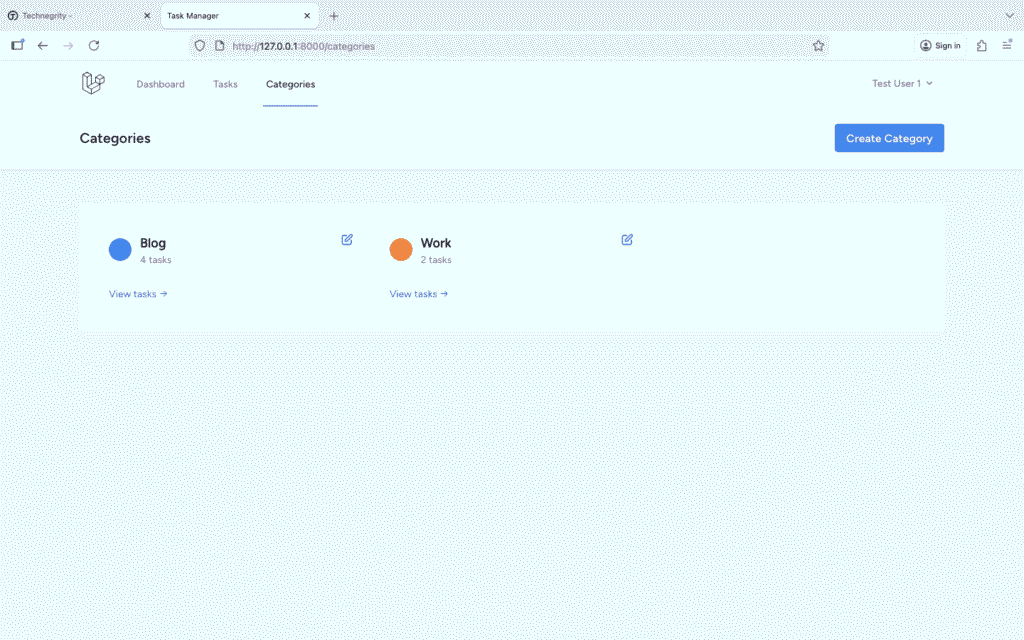
Categories Index Page
Create resources/views/categories/index.blade.php:
<x-app-layout>
    <x-slot name="header">
        <div class="flex justify-between items-center">
            <h2 class="font-semibold text-xl text-gray-800 leading-tight">
                {{ __('Categories') }}
            </h2>
            <a href="{{ route('categories.create') }}"
               class="bg-blue-500 hover:bg-blue-700 text-white font-bold py-2 px-4 rounded">
                Create Category
            </a>
        </div>
    </x-slot>

    <div class="py-12">
        <div class="max-w-7xl mx-auto sm:px-6 lg:px-8">
            <div class="bg-white overflow-hidden shadow-sm sm:rounded-lg">
                <div class="p-6">
                    @if($categories->count() > 0)
                        <div class="grid grid-cols-1 md:grid-cols-2 lg:grid-cols-3 gap-4">
                            @foreach($categories as $category)
                                <div class="border rounded-lg p-4 hover:shadow-md transition">
                                    <div class="flex items-start justify-between">
                                        <div class="flex items-center space-x-3 flex-1">
                                            <!-- Color Indicator -->
                                            <div class="w-8 h-8 rounded-full flex-shrink-0"
                                                 style="background-color: {{ $category->color }}">
                                            </div>

                                            <div class="flex-1">
                                                <h3 class="font-semibold text-lg">{{ $category->name }}</h3>
                                                <p class="text-sm text-gray-500">
                                                    {{ $category->tasks_count }} {{ Str::plural('task', $category->tasks_count) }}
                                                </p>
                                            </div>
                                        </div>

                                        <!-- Actions -->
                                        <div class="flex gap-2 ml-4">
                                            <a href="{{ route('categories.edit', $category) }}"
                                               class="text-blue-600 hover:text-blue-800">
                                                <svg class="w-5 h-5" fill="none" stroke="currentColor" viewBox="0 0 24 24">
                                                    <path stroke-linecap="round" stroke-linejoin="round" stroke-width="2" d="M11 5H6a2 2 0 00-2 2v11a2 2 0 002 2h11a2 2 0 002-2v-5m-1.414-9.414a2 2 0 112.828 2.828L11.828 15H9v-2.828l8.586-8.586z"></path>
                                                </svg>
                                            </a>

                                            @if($category->tasks_count == 0)
                                                <form method="POST"
                                                      action="{{ route('categories.destroy', $category) }}"
                                                      onsubmit="return confirm('Are you sure you want to delete this category?');">
                                                    @csrf
                                                    @method('DELETE')
                                                    <button type="submit" class="text-red-600 hover:text-red-800">
                                                        <svg class="w-5 h-5" fill="none" stroke="currentColor" viewBox="0 0 24 24">
                                                            <path stroke-linecap="round" stroke-linejoin="round" stroke-width="2" d="M19 7l-.867 12.142A2 2 0 0116.138 21H7.862a2 2 0 01-1.995-1.858L5 7m5 4v6m4-6v6m1-10V4a1 1 0 00-1-1h-4a1 1 0 00-1 1v3M4 7h16"></path>
                                                        </svg>
                                                    </button>
                                                </form>
                                            @endif
                                        </div>
                                    </div>

                                    <!-- View Tasks Link -->
                                    @if($category->tasks_count > 0)
                                        <div class="mt-3 pt-3 border-t">
                                            <a href="{{ route('tasks.index', ['category' => $category->id]) }}"
                                               class="text-sm text-blue-600 hover:text-blue-800">
                                                View tasks →
                                            </a>
                                        </div>
                                    @endif
                                </div>
                            @endforeach
                        </div>
                    @else
                        <!-- Empty State -->
                        <div class="text-center py-12">
                            <svg class="mx-auto h-12 w-12 text-gray-400" fill="none" stroke="currentColor" viewBox="0 0 24 24">
                                <path stroke-linecap="round" stroke-linejoin="round" stroke-width="2" d="M7 7h.01M7 3h5c.512 0 1.024.195 1.414.586l7 7a2 2 0 010 2.828l-7 7a2 2 0 01-2.828 0l-7-7A1.994 1.994 0 013 12V7a4 4 0 014-4z"></path>
                            </svg>
                            <h3 class="mt-2 text-sm font-medium text-gray-900">No categories</h3>
                            <p class="mt-1 text-sm text-gray-500">Get started by creating your first category.</p>
                            <div class="mt-6">
                                <a href="{{ route('categories.create') }}"
                                   class="inline-flex items-center px-4 py-2 border border-transparent shadow-sm text-sm font-medium rounded-md text-white bg-blue-600 hover:bg-blue-700">
                                    Create Category
                                </a>
                            </div>
                        </div>
                    @endif
                </div>
            </div>
        </div>
    </div>
</x-app-layout>
Category Create Form
Create resources/views/categories/create.blade.php:
<x-app-layout>
    <x-slot name="header">
        <h2 class="font-semibold text-xl text-gray-800 leading-tight">
            {{ __('Create Category') }}
        </h2>
    </x-slot>

    <div class="py-12">
        <div class="max-w-2xl mx-auto sm:px-6 lg:px-8">
            <div class="bg-white overflow-hidden shadow-sm sm:rounded-lg">
                <div class="p-6">
                    <form method="POST" action="{{ route('categories.store') }}" class="space-y-6">
                        @csrf

                        <!-- Name -->
                        <div>
                            <label for="name" class="block text-sm font-medium text-gray-700">
                                Category Name <span class="text-red-500">*</span>
                            </label>
                            <input type="text"
                                   name="name"
                                   id="name"
                                   value="{{ old('name') }}"
                                   required
                                   placeholder="e.g., Work, Personal, Shopping"
                                   class="mt-1 block w-full rounded-md border-gray-300 shadow-sm focus:border-blue-500 focus:ring-blue-500 @error('name') border-red-500 @enderror">
                            @error('name')
                                <p class="mt-1 text-sm text-red-600">{{ $message }}</p>
                            @enderror
                        </div>

                        <!-- Color Picker -->
                        <div>
                            <label for="color" class="block text-sm font-medium text-gray-700 mb-2">
                                Category Color <span class="text-red-500">*</span>
                            </label>

                            <!-- Predefined Colors -->
                            <div class="mb-3">
                                <p class="text-xs text-gray-500 mb-2">Quick Select:</p>
                                <div class="flex flex-wrap gap-2">
                                    @foreach([
                                        '#EF4444' => 'Red',
                                        '#F59E0B' => 'Orange',
                                        '#10B981' => 'Green',
                                        '#3B82F6' => 'Blue',
                                        '#8B5CF6' => 'Purple',
                                        '#EC4899' => 'Pink',
                                        '#6366F1' => 'Indigo',
                                        '#14B8A6' => 'Teal'
                                    ] as $colorValue => $colorName)
                                        <button type="button"
                                                onclick="document.getElementById('color').value='{{ $colorValue }}'; updateColorPreview('{{ $colorValue }}');"
                                                class="w-10 h-10 rounded-full border-2 border-gray-300 hover:border-gray-600 transition"
                                                style="background-color: {{ $colorValue }}"
                                                title="{{ $colorName }}">
                                        </button>
                                    @endforeach
                                </div>
                            </div>

                            <!-- Custom Color Input -->
                            <div class="flex items-center gap-3">
                                <input type="color"
                                       name="color"
                                       id="color"
                                       value="{{ old('color', '#3B82F6') }}"
                                       required
                                       onchange="updateColorPreview(this.value)"
                                       class="h-10 w-20 rounded border-gray-300 cursor-pointer">

                                <div class="flex-1">
                                    <input type="text"
                                           id="color-hex"
                                           value="{{ old('color', '#3B82F6') }}"
                                           readonly
                                           class="block w-full rounded-md border-gray-300 bg-gray-50 text-sm">
                                </div>

                                <!-- Preview -->
                                <div id="color-preview"
                                     class="w-20 h-10 rounded border-2 border-gray-300"
                                     style="background-color: {{ old('color', '#3B82F6') }}">
                                </div>
                            </div>

                            @error('color')
                                <p class="mt-1 text-sm text-red-600">{{ $message }}</p>
                            @enderror
                        </div>

                        <!-- Action Buttons -->
                        <div class="flex gap-4 pt-4">
                            <button type="submit"
                                    class="bg-blue-500 hover:bg-blue-700 text-white font-bold py-2 px-4 rounded">
                                Create Category
                            </button>
                            <a href="{{ route('categories.index') }}"
                               class="bg-gray-500 hover:bg-gray-700 text-white font-bold py-2 px-4 rounded inline-block">
                                Cancel
                            </a>
                        </div>
                    </form>
                </div>
            </div>
        </div>
    </div>

    <script>
        function updateColorPreview(color) {
            document.getElementById('color-preview').style.backgroundColor = color;
            document.getElementById('color-hex').value = color.toUpperCase();
        }
    </script>
</x-app-layout>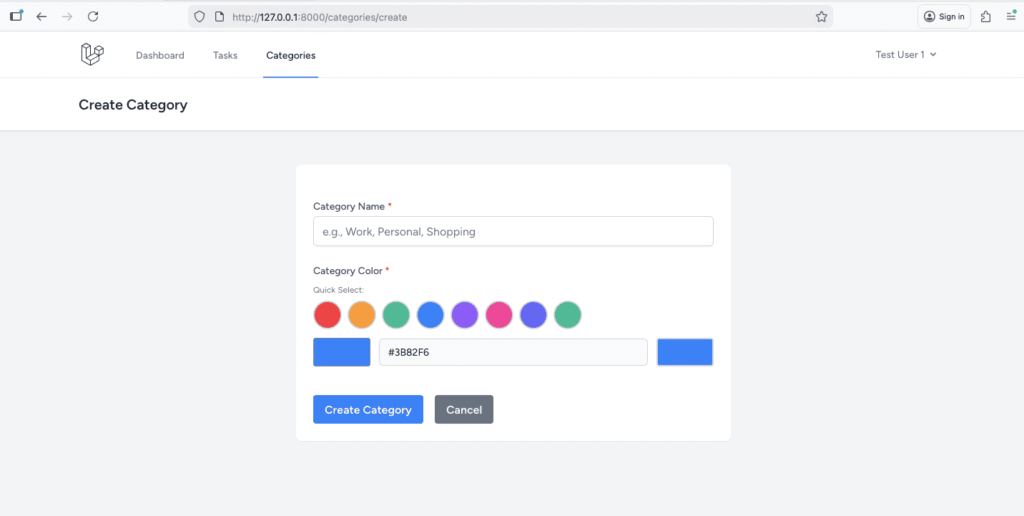
Category Edit Form
Create resources/views/categories/edit.blade.php:
<x-app-layout>
    <x-slot name="header">
        <h2 class="font-semibold text-xl text-gray-800 leading-tight">
            {{ __('Edit Category') }}
        </h2>
    </x-slot>

    <div class="py-12">
        <div class="max-w-2xl mx-auto sm:px-6 lg:px-8">
            <div class="bg-white overflow-hidden shadow-sm sm:rounded-lg">
                <div class="p-6">
                    <form method="POST" action="{{ route('categories.update', $category) }}" class="space-y-6">
                        @csrf
                        @method('PUT')

                        <!-- Name -->
                        <div>
                            <label for="name" class="block text-sm font-medium text-gray-700">
                                Category Name <span class="text-red-500">*</span>
                            </label>
                            <input type="text"
                                   name="name"
                                   id="name"
                                   value="{{ old('name', $category->name) }}"
                                   required
                                   class="mt-1 block w-full rounded-md border-gray-300 shadow-sm focus:border-blue-500 focus:ring-blue-500 @error('name') border-red-500 @enderror">
                            @error('name')
                                <p class="mt-1 text-sm text-red-600">{{ $message }}</p>
                            @enderror
                        </div>

                        <!-- Color Picker -->
                        <div>
                            <label for="color" class="block text-sm font-medium text-gray-700 mb-2">
                                Category Color <span class="text-red-500">*</span>
                            </label>

                            <!-- Predefined Colors -->
                            <div class="mb-3">
                                <p class="text-xs text-gray-500 mb-2">Quick Select:</p>
                                <div class="flex flex-wrap gap-2">
                                    @foreach([
                                        '#EF4444' => 'Red',
                                        '#F59E0B' => 'Orange',
                                        '#10B981' => 'Green',
                                        '#3B82F6' => 'Blue',
                                        '#8B5CF6' => 'Purple',
                                        '#EC4899' => 'Pink',
                                        '#6366F1' => 'Indigo',
                                        '#14B8A6' => 'Teal'
                                    ] as $colorValue => $colorName)
                                        <button type="button"
                                                onclick="document.getElementById('color').value='{{ $colorValue }}'; updateColorPreview('{{ $colorValue }}');"
                                                class="w-10 h-10 rounded-full border-2 {{ old('color', $category->color) == $colorValue ? 'border-gray-800' : 'border-gray-300' }} hover:border-gray-600 transition"
                                                style="background-color: {{ $colorValue }}"
                                                title="{{ $colorName }}">
                                        </button>
                                    @endforeach
                                </div>
                            </div>

                            <!-- Custom Color Input -->
                            <div class="flex items-center gap-3">
                                <input type="color"
                                       name="color"
                                       id="color"
                                       value="{{ old('color', $category->color) }}"
                                       required
                                       onchange="updateColorPreview(this.value)"
                                       class="h-10 w-20 rounded border-gray-300 cursor-pointer">

                                <div class="flex-1">
                                    <input type="text"
                                           id="color-hex"
                                           value="{{ old('color', $category->color) }}"
                                           readonly
                                           class="block w-full rounded-md border-gray-300 bg-gray-50 text-sm">
                                </div>

                                <!-- Preview -->
                                <div id="color-preview"
                                     class="w-20 h-10 rounded border-2 border-gray-300"
                                     style="background-color: {{ old('color', $category->color) }}">
                                </div>
                            </div>

                            @error('color')
                                <p class="mt-1 text-sm text-red-600">{{ $message }}</p>
                            @enderror
                        </div>

                        <!-- Task Count Info -->
                        <div class="bg-blue-50 border border-blue-200 rounded p-4">
                            <p class="text-sm text-blue-800">
                                This category has <strong>{{ $category->tasks()->count() }}</strong> task(s) assigned.
                            </p>
                        </div>

                        <!-- Action Buttons -->
                        <div class="flex gap-4 pt-4">
                            <button type="submit"
                                    class="bg-blue-500 hover:bg-blue-700 text-white font-bold py-2 px-4 rounded">
                                Update Category
                            </button>
                            <a href="{{ route('categories.index') }}"
                               class="bg-gray-500 hover:bg-gray-700 text-white font-bold py-2 px-4 rounded inline-block">
                                Cancel
                            </a>
                        </div>
                    </form>
                </div>
            </div>
        </div>
    </div>

    <script>
        function updateColorPreview(color) {
            document.getElementById('color-preview').style.backgroundColor = color;
            document.getElementById('color-hex').value = color.toUpperCase();
        }
    </script>
</x-app-layout>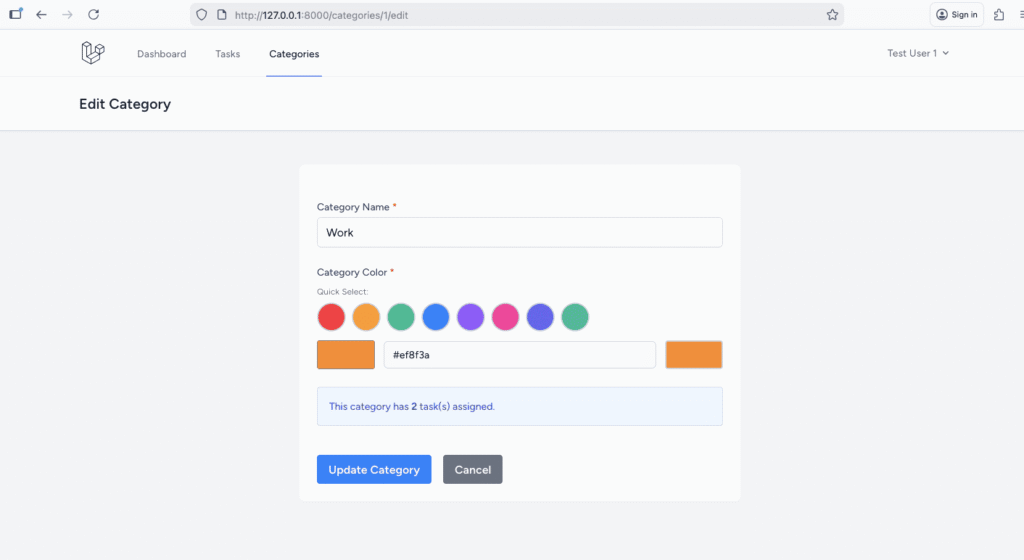
Step 3: Building the Dashboard with Statistics
Let’s create an informative dashboard that gives users insights into their tasks.
Creating Dashboard Controller
php artisan make:controller DashboardControllerEdit app/Http/Controllers/DashboardController.php:
<?php

namespace App\Http\Controllers;

use App\Models\Task;
use Illuminate\Http\Request;
use Illuminate\Support\Facades\DB;

class DashboardController extends Controller
{
    public function index()
    {
        $user = auth()->user();

        // Basic statistics
        $stats = [
            'total' => $user->tasks()->count(),
            'pending' => $user->tasks()->where('status', 'pending')->count(),
            'in_progress' => $user->tasks()->where('status', 'in_progress')->count(),
            'completed' => $user->tasks()->where('status', 'completed')->count(),
            'overdue' => $user->tasks()
                ->where('status', '!=', 'completed')
                ->where('due_date', '<', now())
                ->count(),
        ];

        // Calculate completion rate
        $stats['completion_rate'] = $stats['total'] > 0
            ? round(($stats['completed'] / $stats['total']) * 100, 1)
            : 0;

        // Priority distribution
        $priorityStats = $user->tasks()
            ->select('priority', DB::raw('count(*) as count'))
            ->groupBy('priority')
            ->pluck('count', 'priority')
            ->toArray();

        // Recent tasks
        $recentTasks = $user->tasks()
            ->with('categories')
            ->latest()
            ->limit(5)
            ->get();

        // Upcoming tasks (due in next 7 days)
        $upcomingTasks = $user->tasks()
            ->with('categories')
            ->where('status', '!=', 'completed')
            ->whereBetween('due_date', [now(), now()->addDays(7)])
            ->orderBy('due_date')
            ->limit(5)
            ->get();

        // Overdue tasks
        $overdueTasks = $user->tasks()
            ->with('categories')
            ->where('status', '!=', 'completed')
            ->where('due_date', '<', now())
            ->orderBy('due_date')
            ->limit(5)
            ->get();

        // Category statistics
        $categoryStats = $user->categories()
            ->withCount('tasks')
            ->orderByDesc('tasks_count')
            ->limit(5)
            ->get();

        return view('dashboard', compact(
            'stats',
            'priorityStats',
            'recentTasks',
            'upcomingTasks',
            'overdueTasks',
            'categoryStats'
        ));
    }
}
Replace the existing dashboard route with this in web.php:
Route::get('/dashboard', [DashboardController::class, 'index'])->name('dashboard');Creating Dashboard View
Update resources/views/dashboard.blade.php:
<x-app-layout>
<x-slot name="header">
<h2 class="font-semibold text-xl text-gray-800 leading-tight">
{{ __('Dashboard') }}
</h2>
</x-slot>
<div class="py-12">
<div class="max-w-7xl mx-auto sm:px-6 lg:px-8 space-y-6">
<!-- Statistics Cards -->
<div class="grid grid-cols-1 md:grid-cols-2 lg:grid-cols-4 gap-4">
<!-- Total Tasks -->
<div class="bg-white overflow-hidden shadow-sm sm:rounded-lg">
<div class="p-6">
<div class="flex items-center">
<div class="flex-shrink-0 bg-blue-100 rounded-md p-3">
<svg class="h-6 w-6 text-blue-600" fill="none" stroke="currentColor" viewBox="0 0 24 24">
<path stroke-linecap="round" stroke-linejoin="round" stroke-width="2" d="M9 5H7a2 2 0 00-2 2v12a2 2 0 002 2h10a2 2 0 002-2V7a2 2 0 00-2-2h-2M9 5a2 2 0 002 2h2a2 2 0 002-2M9 5a2 2 0 012-2h2a2 2 0 012 2"></path>
</svg>
</div>
<div class="ml-4">
<p class="text-sm font-medium text-gray-500">Total Tasks</p>
<p class="text-2xl font-semibold text-gray-900">{{ $stats['total'] }}</p>
</div>
</div>
</div>
</div>
<!-- Pending Tasks -->
<div class="bg-white overflow-hidden shadow-sm sm:rounded-lg">
<div class="p-6">
<div class="flex items-center">
<div class="flex-shrink-0 bg-yellow-100 rounded-md p-3">
<svg class="h-6 w-6 text-yellow-600" fill="none" stroke="currentColor" viewBox="0 0 24 24">
<path stroke-linecap="round" stroke-linejoin="round" stroke-width="2" d="M12 8v4l3 3m6-3a9 9 0 11-18 0 9 9 0 0118 0z"></path>
</svg>
</div>
<div class="ml-4">
<p class="text-sm font-medium text-gray-500">Pending</p>
<p class="text-2xl font-semibold text-gray-900">{{ $stats['pending'] }}</p>
</div>
</div>
</div>
</div>
<!-- In Progress -->
<div class="bg-white overflow-hidden shadow-sm sm:rounded-lg">
<div class="p-6">
<div class="flex items-center">
<div class="flex-shrink-0 bg-blue-100 rounded-md p-3">
<svg class="h-6 w-6 text-blue-600" fill="none" stroke="currentColor" viewBox="0 0 24 24">
<path stroke-linecap="round" stroke-linejoin="round" stroke-width="2" d="M13 10V3L4 14h7v7l9-11h-7z"></path>
</svg>
</div>
<div class="ml-4">
<p class="text-sm font-medium text-gray-500">In Progress</p>
<p class="text-2xl font-semibold text-gray-900">{{ $stats['in_progress'] }}</p>
</div>
</div>
</div>
</div>
<!-- Completed -->
<div class="bg-white overflow-hidden shadow-sm sm:rounded-lg">
<div class="p-6">
<div class="flex items-center">
<div class="flex-shrink-0 bg-green-100 rounded-md p-3">
<svg class="h-6 w-6 text-green-600" fill="none" stroke="currentColor" viewBox="0 0 24 24">
<path stroke-linecap="round" stroke-linejoin="round" stroke-width="2" d="M9 12l2 2 4-4m6 2a9 9 0 11-18 0 9 9 0 0118 0z"></path>
</svg>
</div>
<div class="ml-4">
<p class="text-sm font-medium text-gray-500">Completed</p>
<p class="text-2xl font-semibold text-gray-900">{{ $stats['completed'] }}</p>
</div>
</div>
</div>
</div>
</div>
<!-- Completion Rate & Overdue -->
<div class="grid grid-cols-1 md:grid-cols-2 gap-4">
<!-- Completion Rate -->
<div class="bg-white overflow-hidden shadow-sm sm:rounded-lg">
<div class="p-6">
<h3 class="text-lg font-semibold mb-4">Completion Rate</h3>
<div class="flex items-center">
<div class="flex-1">
<div class="relative pt-1">
<div class="flex mb-2 items-center justify-between">
<div>
<span class="text-xs font-semibold inline-block py-1 px-2 uppercase rounded-full text-green-600 bg-green-200">
Progress
</span>
</div>
<div class="text-right">
<span class="text-xs font-semibold inline-block text-green-600">
{{ $stats['completion_rate'] }}%
</span>
</div>
</div>
<div class="overflow-hidden h-2 mb-4 text-xs flex rounded bg-green-200">
<div style="width:{{ $stats['completion_rate'] }}%"
class="shadow-none flex flex-col text-center whitespace-nowrap text-white justify-center bg-green-500">
</div>
</div>
</div>
<p class="text-sm text-gray-600">
{{ $stats['completed'] }} of {{ $stats['total'] }} tasks completed
</p>
</div>
</div>
</div>
</div>
<!-- Overdue Tasks -->
<div class="bg-white overflow-hidden shadow-sm sm:rounded-lg">
<div class="p-6">
<h3 class="text-lg font-semibold mb-4">Overdue Tasks</h3>
@if($stats['overdue'] > 0)
<div class="flex items-center">
<div class="flex-shrink-0 bg-red-100 rounded-full p-4">
<svg class="h-8 w-8 text-red-600" fill="none" stroke="currentColor" viewBox="0 0 24 24">
<path stroke-linecap="round" stroke-linejoin="round" stroke-width="2" d="M12 8v4m0 4h.01M21 12a9 9 0 11-18 0 9 9 0 0118 0z"></path>
</svg>
</div>
<div class="ml-4">
<p class="text-3xl font-bold text-red-600">{{ $stats['overdue'] }}</p>
<p class="text-sm text-gray-600">{{ Str::plural('task', $stats['overdue']) }} need attention</p>
<a href="{{ route('tasks.index', ['overdue' => 1]) }}"
class="text-sm text-blue-600 hover:text-blue-800 mt-2 inline-block">
View overdue tasks →
</a>
</div>
</div>
@else
<div class="text-center py-6">
<svg class="mx-auto h-12 w-12 text-green-400" fill="none" stroke="currentColor" viewBox="0 0 24 24">
<path stroke-linecap="round" stroke-linejoin="round" stroke-width="2" d="M9 12l2 2 4-4m6 2a9 9 0 11-18 0 9 9 0 0118 0z"></path>
</svg>
<p class="mt-2 text-sm text-gray-600">Great job! No overdue tasks.</p>
</div>
@endif
</div>
</div>
</div>
<!-- Priority Distribution -->
<div class="bg-white overflow-hidden shadow-sm sm:rounded-lg">
<div class="p-6">
<h3 class="text-lg font-semibold mb-4">Tasks by Priority</h3>
<div class="grid grid-cols-3 gap-4">
<div class="text-center">
<div class="text-3xl font-bold text-green-600">{{ $priorityStats['low'] ?? 0 }}</div>
<div class="text-sm text-gray-600 mt-1">Low Priority</div>
</div>
<div class="text-center">
<div class="text-3xl font-bold text-yellow-600">{{ $priorityStats['medium'] ?? 0 }}</div>
<div class="text-sm text-gray-600 mt-1">Medium Priority</div>
</div>
<div class="text-center">
<div class="text-3xl font-bold text-red-600">{{ $priorityStats['high'] ?? 0 }}</div>
<div class="text-sm text-gray-600 mt-1">High Priority</div>
</div>
</div>
</div>
</div>
<!-- Recent, Upcoming, and Overdue Tasks -->
<div class="grid grid-cols-1 lg:grid-cols-3 gap-4">
<!-- Recent Tasks -->
<div class="bg-white overflow-hidden shadow-sm sm:rounded-lg">
<div class="p-6">
<h3 class="text-lg font-semibold mb-4">Recent Tasks</h3>
@if($recentTasks->count() > 0)
<div class="space-y-3">
@foreach($recentTasks as $task)
<div class="border-l-4 pl-3 py-2" style="border-color: {{ $task->categories->first()?->color ?? '#ccc' }}">
<a href="{{ route('tasks.show', $task) }}"
class="text-sm font-medium text-gray-900 hover:text-blue-600">
{{ Str::limit($task->title, 40) }}
</a>
<div class="flex items-center gap-2 mt-1">
<x-status-badge :status="$task->status" />
<x-priority-indicator :priority="$task->priority" />
</div>
</div>
@endforeach
</div>
@else
<p class="text-sm text-gray-500">No tasks yet.</p>
@endif
<a href="{{ route('tasks.index') }}"
class="text-sm text-blue-600 hover:text-blue-800 mt-4 inline-block">
View all tasks →
</a>
</div>
</div>
<!-- Upcoming Tasks -->
<div class="bg-white overflow-hidden shadow-sm sm:rounded-lg">
<div class="p-6">
<h3 class="text-lg font-semibold mb-4">Due Soon (Next 7 Days)</h3>
@if($upcomingTasks->count() > 0)
<div class="space-y-3">
@foreach($upcomingTasks as $task)
<div class="border-l-4 border-blue-500 pl-3 py-2">
<a href="{{ route('tasks.show', $task) }}"
class="text-sm font-medium text-gray-900 hover:text-blue-600">
{{ Str::limit($task->title, 40) }}
</a>
<p class="text-xs text-gray-500 mt-1">
Due: {{ $task->due_date->format('M d, Y') }}
</p>
</div>
@endforeach
</div>
@else
<p class="text-sm text-gray-500">No upcoming tasks.</p>
@endif
</div>
</div>
<!-- Overdue Tasks -->
<div class="bg-white overflow-hidden shadow-sm sm:rounded-lg">
<div class="p-6">
<h3 class="text-lg font-semibold mb-4 text-red-600">Overdue</h3>
@if($overdueTasks->count() > 0)
<div class="space-y-3">
@foreach($overdueTasks as $task)
<div class="border-l-4 border-red-500 pl-3 py-2">
<a href="{{ route('tasks.show', $task) }}"
class="text-sm font-medium text-gray-900 hover:text-blue-600">
{{ Str::limit($task->title, 40) }}
</a>
<p class="text-xs text-red-600 mt-1">
Was due: {{ $task->due_date->format('M d, Y') }}
</p>
</div>
@endforeach
</div>
@else
<div class="text-center py-4">
<svg class="mx-auto h-8 w-8 text-green-400" fill="none" stroke="currentColor" viewBox="0 0 24 24">
<path stroke-linecap="round" stroke-linejoin="round" stroke-width="2" d="M9 12l2 2 4-4m6 2a9 9 0 11-18 0 9 9 0 0118 0z"></path>
</svg>
<p class="text-sm text-gray-500 mt-2">All caught up!</p>
</div>
@endif
</div>
</div>
</div>
<!-- Top Categories -->
@if($categoryStats->count() > 0)
<div class="bg-white overflow-hidden shadow-sm sm:rounded-lg">
<div class="p-6">
<h3 class="text-lg font-semibold mb-4">Most Used Categories</h3>
<div class="space-y-3">
@foreach($categoryStats as $category)
<div class="flex items-center justify-between">
<div class="flex items-center space-x-3">
<div class="w-4 h-4 rounded-full" style="background-color: {{ $category->color }}"></div>
<span class="text-sm font-medium">{{ $category->name }}</span>
</div>
<div class="flex items-center space-x-4">
<span class="text-sm text-gray-600">{{ $category->tasks_count }} {{ Str::plural('task', $category->tasks_count) }}</span>
<div class="w-24 bg-gray-200 rounded-full h-2">
<div class="h-2 rounded-full"
style="width: {{ ($category->tasks_count / $stats['total']) * 100 }}%; background-color: {{ $category->color }}">
</div>
</div>
</div>
</div>
@endforeach
</div>
</div>
</div>
@endif
<!-- Quick Actions -->
<div class="bg-white overflow-hidden shadow-sm sm:rounded-lg">
<div class="p-6">
<h3 class="text-lg font-semibold mb-4">Quick Actions</h3>
<div class="grid grid-cols-2 md:grid-cols-4 gap-4">
<a href="{{ route('tasks.create') }}"
class="flex flex-col items-center p-4 border-2 border-dashed border-gray-300 rounded-lg hover:border-blue-500 hover:bg-blue-50 transition">
<svg class="h-8 w-8 text-gray-400" fill="none" stroke="currentColor" viewBox="0 0 24 24">
<path stroke-linecap="round" stroke-linejoin="round" stroke-width="2" d="M12 4v16m8-8H4"></path>
</svg>
<span class="mt-2 text-sm font-medium text-gray-700">New Task</span>
</a>
<a href="{{ route('categories.create') }}"
class="flex flex-col items-center p-4 border-2 border-dashed border-gray-300 rounded-lg hover:border-blue-500 hover:bg-blue-50 transition">
<svg class="h-8 w-8 text-gray-400" fill="none" stroke="currentColor" viewBox="0 0 24 24">
<path stroke-linecap="round" stroke-linejoin="round" stroke-width="2" d="M7 7h.01M7 3h5c.512 0 1.024.195 1.414.586l7 7a2 2 0 010 2.828l-7 7a2 2 0 01-2.828 0l-7-7A1.994 1.994 0 013 12V7a4 4 0 014-4z"></path>
</svg>
<span class="mt-2 text-sm font-medium text-gray-700">New Category</span>
</a>
<a href="{{ route('tasks.index', ['status' => 'pending']) }}"
class="flex flex-col items-center p-4 border-2 border-dashed border-gray-300 rounded-lg hover:border-blue-500 hover:bg-blue-50 transition">
<svg class="h-8 w-8 text-gray-400" fill="none" stroke="currentColor" viewBox="0 0 24 24">
<path stroke-linecap="round" stroke-linejoin="round" stroke-width="2" d="M12 8v4l3 3m6-3a9 9 0 11-18 0 9 9 0 0118 0z"></path>
</svg>
<span class="mt-2 text-sm font-medium text-gray-700">Pending Tasks</span>
</a>
<a href="{{ route('tasks.index', ['status' => 'completed']) }}"
class="flex flex-col items-center p-4 border-2 border-dashed border-gray-300 rounded-lg hover:border-blue-500 hover:bg-blue-50 transition">
<svg class="h-8 w-8 text-gray-400" fill="none" stroke="currentColor" viewBox="0 0 24 24">
<path stroke-linecap="round" stroke-linejoin="round" stroke-width="2" d="M9 12l2 2 4-4m6 2a9 9 0 11-18 0 9 9 0 0118 0z"></path>
</svg>
<span class="mt-2 text-sm font-medium text-gray-700">Completed Tasks</span>
</a>
</div>
</div>
</div>
</div>
</div>
</x-app-layout>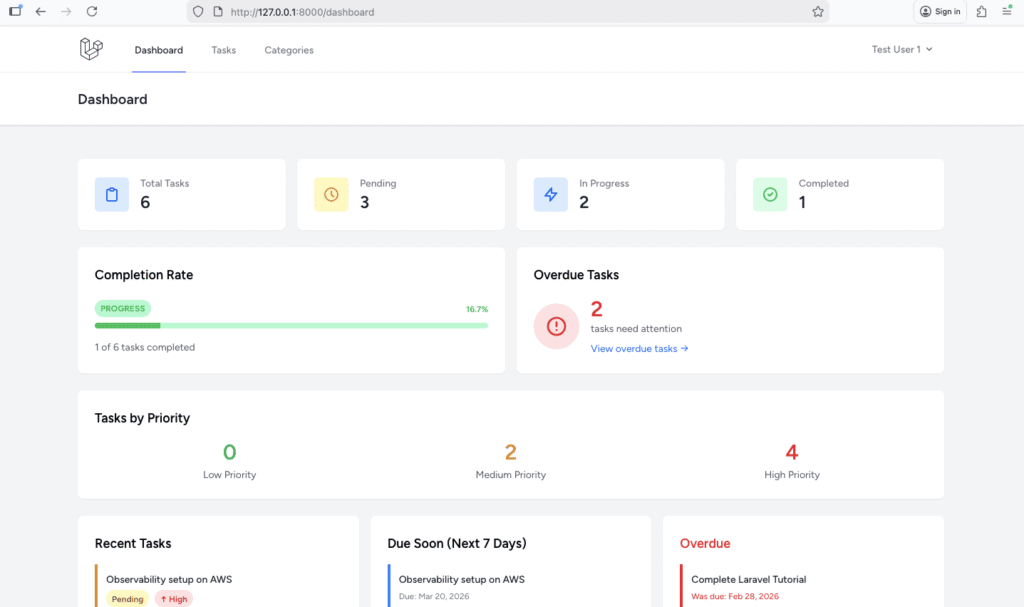
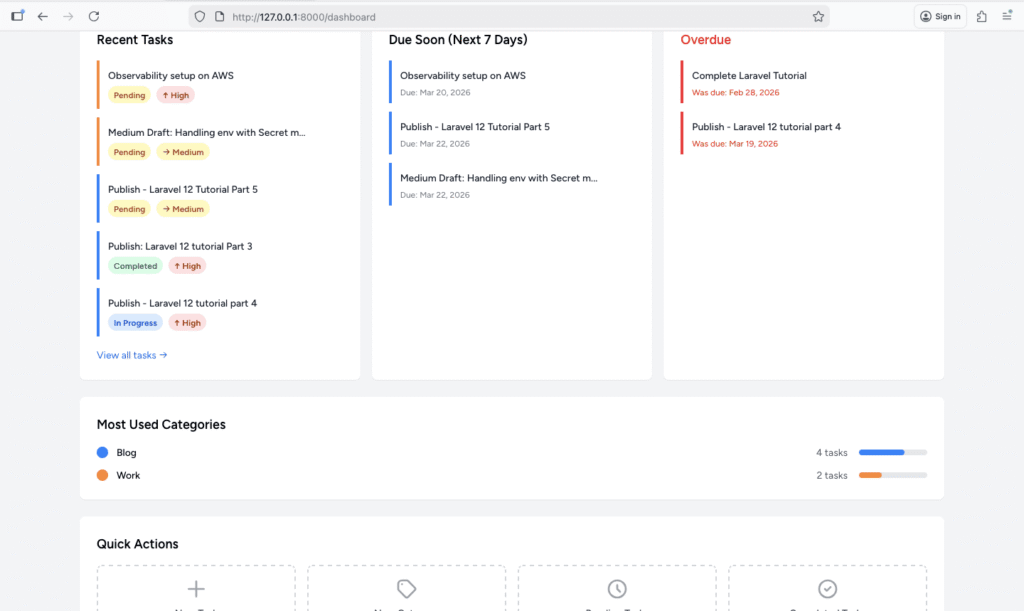
Step 4: Kanban Board View
Let’s create a Kanban board to visualize tasks by status.
Adding Kanban Route and Method
Add to TaskController.php:
public function kanban()
{
    $statuses = ['pending', 'in_progress', 'completed', 'archived'];

    $tasksByStatus = [];
    foreach ($statuses as $status) {
        $tasksByStatus[$status] = auth()->user()->tasks()
            ->with('categories')
            ->where('status', $status)
            ->orderBy('priority', 'desc')
            ->orderBy('due_date')
            ->get();
    }

    return view('tasks.kanban', compact('tasksByStatus'));
}
Add route in routes/web.php:
Route::middleware(['auth', 'verified'])->group(function () {
    Route::get('/dashboard', [DashboardController::class, 'index'])->name('dashboard');

    Route::get('/tasks/kanban', [TaskController::class, 'kanban'])->name('tasks.kanban');
    Route::resource('tasks', TaskController::class);
    Route::resource('categories', CategoryController::class);
});
Creating Kanban View
Create resources/views/tasks/kanban.blade.php:
<x-app-layout>
<x-slot name="header">
<div class="flex justify-between items-center">
<h2 class="font-semibold text-xl text-gray-800 leading-tight">
{{ __('Kanban Board') }}
</h2>
<div class="flex gap-2">
<a href="{{ route('tasks.index') }}"
class="bg-gray-500 hover:bg-gray-700 text-white font-bold py-2 px-4 rounded">
List View
</a>
<a href="{{ route('tasks.create') }}"
class="bg-blue-500 hover:bg-blue-700 text-white font-bold py-2 px-4 rounded">
New Task
</a>
</div>
</div>
</x-slot>
<div class="py-12">
<div class="max-w-7xl mx-auto sm:px-6 lg:px-8">
<div class="grid grid-cols-1 md:grid-cols-2 lg:grid-cols-4 gap-4">
<!-- Pending Column -->
<div class="bg-yellow-50 rounded-lg">
<div class="p-4 border-b-4 border-yellow-400">
<h3 class="font-semibold text-lg flex items-center justify-between">
<span>Pending</span>
<span class="bg-yellow-200 text-yellow-800 text-xs font-bold px-2 py-1 rounded-full">
{{ $tasksByStatus['pending']->count() }}
</span>
</h3>
</div>
<div class="p-4 space-y-3 min-h-[500px]">
@forelse($tasksByStatus['pending'] as $task)
<div class="bg-white rounded-lg p-4 shadow hover:shadow-md transition">
<a href="{{ route('tasks.show', $task) }}"
class="font-medium text-gray-900 hover:text-blue-600 block mb-2">
{{ $task->title }}
</a>
@if($task->due_date)
<p class="text-xs text-gray-500 mb-2">
Due: {{ $task->due_date->format('M d, Y') }}
</p>
@endif
@if($task->categories->count() > 0)
<div class="flex flex-wrap gap-1 mb-2">
@foreach($task->categories as $category)
<span class="px-2 py-1 text-xs rounded-full text-white"
style="background-color: {{ $category->color }}">
{{ $category->name }}
</span>
@endforeach
</div>
@endif
<div class="flex items-center justify-between mt-3">
<x-priority-indicator :priority="$task->priority" />
<form method="POST" action="{{ route('tasks.updateStatus', $task) }}">
@csrf
@method('PATCH')
<input type="hidden" name="status" value="in_progress">
<button type="submit"
class="text-xs bg-blue-500 hover:bg-blue-600 text-white px-2 py-1 rounded">
Start →
</button>
</form>
</div>
</div>
@empty
<p class="text-sm text-gray-500 text-center py-8">No pending tasks</p>
@endforelse
</div>
</div>
<!-- In Progress Column -->
<div class="bg-blue-50 rounded-lg">
<div class="p-4 border-b-4 border-blue-400">
<h3 class="font-semibold text-lg flex items-center justify-between">
<span>In Progress</span>
<span class="bg-blue-200 text-blue-800 text-xs font-bold px-2 py-1 rounded-full">
{{ $tasksByStatus['in_progress']->count() }}
</span>
</h3>
</div>
<div class="p-4 space-y-3 min-h-[500px]">
@forelse($tasksByStatus['in_progress'] as $task)
<div class="bg-white rounded-lg p-4 shadow hover:shadow-md transition">
<a href="{{ route('tasks.show', $task) }}"
class="font-medium text-gray-900 hover:text-blue-600 block mb-2">
{{ $task->title }}
</a>
@if($task->due_date)
<p class="text-xs text-gray-500 mb-2">
Due: {{ $task->due_date->format('M d, Y') }}
</p>
@endif
@if($task->categories->count() > 0)
<div class="flex flex-wrap gap-1 mb-2">
@foreach($task->categories as $category)
<span class="px-2 py-1 text-xs rounded-full text-white"
style="background-color: {{ $category->color }}">
{{ $category->name }}
</span>
@endforeach
</div>
@endif
<div class="flex items-center justify-between mt-3">
<x-priority-indicator :priority="$task->priority" />
<div class="flex gap-1">
<form method="POST" action="{{ route('tasks.updateStatus', $task) }}">
@csrf
@method('PATCH')
<input type="hidden" name="status" value="pending">
<button type="submit"
class="text-xs bg-yellow-500 hover:bg-yellow-600 text-white px-2 py-1 rounded">
← Back
</button>
</form>
<form method="POST" action="{{ route('tasks.updateStatus', $task) }}">
@csrf
@method('PATCH')
<input type="hidden" name="status" value="completed">
<button type="submit"
class="text-xs bg-green-500 hover:bg-green-600 text-white px-2 py-1 rounded">
Complete →
</button>
</form>
</div>
</div>
</div>
@empty
<p class="text-sm text-gray-500 text-center py-8">No tasks in progress</p>
@endforelse
</div>
</div>
<!-- Completed Column -->
<div class="bg-green-50 rounded-lg">
<div class="p-4 border-b-4 border-green-400">
<h3 class="font-semibold text-lg flex items-center justify-between">
<span>Completed</span>
<span class="bg-green-200 text-green-800 text-xs font-bold px-2 py-1 rounded-full">
{{ $tasksByStatus['completed']->count() }}
</span>
</h3>
</div>
<div class="p-4 space-y-3 min-h-[500px]">
@forelse($tasksByStatus['completed'] as $task)
<div class="bg-white rounded-lg p-4 shadow hover:shadow-md transition opacity-75">
<a href="{{ route('tasks.show', $task) }}"
class="font-medium text-gray-900 hover:text-blue-600 block mb-2 line-through">
{{ $task->title }}
</a>
@if($task->categories->count() > 0)
<div class="flex flex-wrap gap-1 mb-2">
@foreach($task->categories as $category)
<span class="px-2 py-1 text-xs rounded-full text-white"
style="background-color: {{ $category->color }}">
{{ $category->name }}
</span>
@endforeach
</div>
@endif
<div class="flex items-center justify-between mt-3">
<span class="text-xs text-gray-500">
✓ Completed
</span>
<form method="POST" action="{{ route('tasks.updateStatus', $task) }}">
@csrf
@method('PATCH')
<input type="hidden" name="status" value="archived">
<button type="submit"
class="text-xs bg-gray-500 hover:bg-gray-600 text-white px-2 py-1 rounded">
Archive →
</button>
</form>
</div>
</div>
@empty
<p class="text-sm text-gray-500 text-center py-8">No completed tasks</p>
@endforelse
</div>
</div>
<!-- Archived Column -->
<div class="bg-gray-50 rounded-lg">
<div class="p-4 border-b-4 border-gray-400">
<h3 class="font-semibold text-lg flex items-center justify-between">
<span>Archived</span>
<span class="bg-gray-200 text-gray-800 text-xs font-bold px-2 py-1 rounded-full">
{{ $tasksByStatus['archived']->count() }}
</span>
</h3>
</div>
<div class="p-4 space-y-3 min-h-[500px]">
@forelse($tasksByStatus['archived'] as $task)
<div class="bg-white rounded-lg p-4 shadow hover:shadow-md transition opacity-60">
<a href="{{ route('tasks.show', $task) }}"
class="font-medium text-gray-600 hover:text-blue-600 block mb-2">
{{ $task->title }}
</a>
@if($task->categories->count() > 0)
<div class="flex flex-wrap gap-1 mb-2">
@foreach($task->categories as $category)
<span class="px-2 py-1 text-xs rounded-full text-white"
style="background-color: {{ $category->color }}">
{{ $category->name }}
</span>
@endforeach
</div>
@endif
<div class="flex items-center justify-between mt-3">
<span class="text-xs text-gray-500">
Archived
</span>
<form method="POST" action="{{ route('tasks.updateStatus', $task) }}">
@csrf
@method('PATCH')
<input type="hidden" name="status" value="completed">
<button type="submit"
class="text-xs bg-green-500 hover:bg-green-600 text-white px-2 py-1 rounded">
← Restore
</button>
</form>
</div>
</div>
@empty
<p class="text-sm text-gray-500 text-center py-8">No archived tasks</p>
@endforelse
</div>
</div>
</div>
</div>
</div>
</x-app-layout>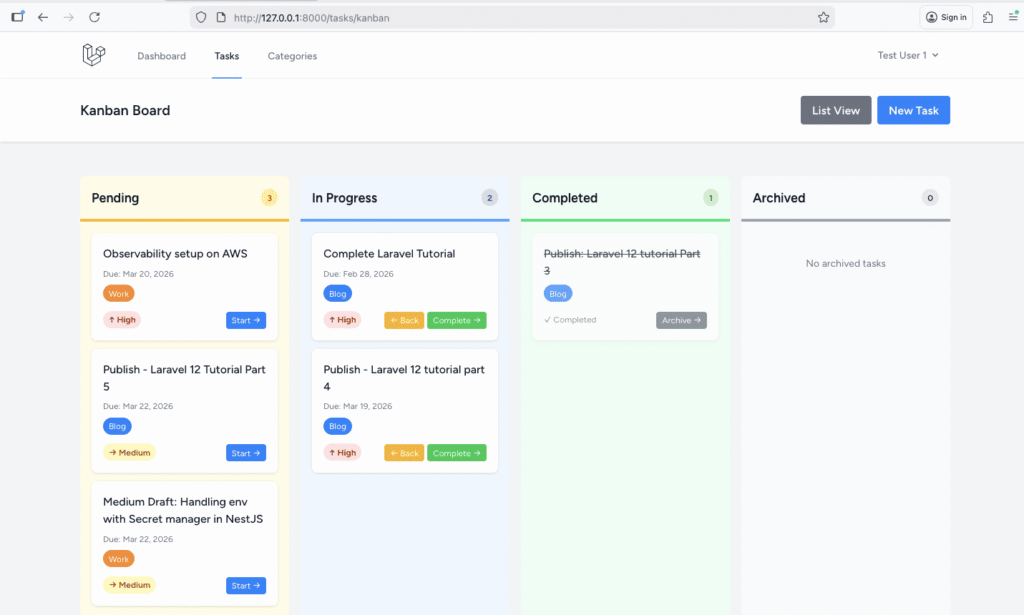
Adding Kanban Link to Navigation
Update your task index page to include a link to Kanban view:
<!-- In tasks/index.blade.php header -->
<div class="flex justify-between items-center">
    <h2 class="font-semibold text-xl text-gray-800 leading-tight">
        {{ __('My Tasks') }}
    </h2>
    <div class="flex gap-2">
        <a href="{{ route('tasks.kanban') }}"
           class="bg-purple-500 hover:bg-purple-700 text-white font-bold py-2 px-4 rounded">
            Kanban View
        </a>
        <a href="{{ route('tasks.create') }}"
           class="bg-blue-500 hover:bg-blue-700 text-white font-bold py-2 px-4 rounded">
            Create New Task
        </a>
    </div>
</div>
Step 5: Advanced Query Scopes
Let’s add useful query scopes to make filtering easier.
Update app/Models/Task.php:
<?php

namespace App\Models;

use Illuminate\Database\Eloquent\Factories\HasFactory;
use Illuminate\Database\Eloquent\Model;
use Illuminate\Database\Eloquent\SoftDeletes;
use Illuminate\Database\Eloquent\Relations\BelongsTo;
use Illuminate\Database\Eloquent\Relations\BelongsToMany;
use Illuminate\Database\Eloquent\Relations\HasMany;

class Task extends Model
{
    use HasFactory, SoftDeletes;

    protected $fillable = [
        'user_id',
        'title',
        'description',
        'priority',
        'status',
        'due_date',
    ];

    protected $casts = [
        'due_date' => 'date',
        'deleted_at' => 'datetime',
    ];

    // Relationships
    public function user(): BelongsTo
    {
        return $this->belongsTo(User::class);
    }

    public function categories(): BelongsToMany
    {
        return $this->belongsToMany(Category::class)->withTimestamps();
    }

    public function attachments(): HasMany
    {
        return $this->hasMany(Attachment::class);
    }

    public function shares(): HasMany
    {
        return $this->hasMany(TaskShare::class);
    }

    // Query Scopes
    public function scopeStatus($query, $status)
    {
        return $query->where('status', $status);
    }

    public function scopePending($query)
    {
        return $query->where('status', 'pending');
    }

    public function scopeInProgress($query)
    {
        return $query->where('status', 'in_progress');
    }

    public function scopeCompleted($query)
    {
        return $query->where('status', 'completed');
    }

    public function scopeArchived($query)
    {
        return $query->where('status', 'archived');
    }

    public function scopeActive($query)
    {
        return $query->whereNotIn('status', ['completed', 'archived']);
    }

    public function scopeOverdue($query)
    {
        return $query->where('due_date', '<', now())
                     ->where('status', '!=', 'completed');
    }

    public function scopeDueToday($query)
    {
        return $query->whereDate('due_date', today());
    }

    public function scopeDueTomorrow($query)
    {
        return $query->whereDate('due_date', today()->addDay());
    }

    public function scopeDueSoon($query, $days = 7)
    {
        return $query->whereBetween('due_date', [today(), today()->addDays($days)])
                     ->where('status', '!=', 'completed');
    }

    public function scopeByPriority($query, $priority)
    {
        return $query->where('priority', $priority);
    }

    public function scopeHighPriority($query)
    {
        return $query->where('priority', 'high');
    }

    public function scopeMediumPriority($query)
    {
        return $query->where('priority', 'medium');
    }

    public function scopeLowPriority($query)
    {
        return $query->where('priority', 'low');
    }

    public function scopeByCategory($query, $categoryId)
    {
        return $query->whereHas('categories', function($q) use ($categoryId) {
            $q->where('categories.id', $categoryId);
        });
    }

    public function scopeWithoutCategory($query)
    {
        return $query->doesntHave('categories');
    }

    public function scopeSearch($query, $search)
    {
        return $query->where(function($q) use ($search) {
            $q->where('title', 'like', '%' . $search . '%')
              ->orWhere('description', 'like', '%' . $search . '%');
        });
    }

    // Accessors
    public function getIsOverdueAttribute(): bool
    {
        return $this->due_date &&
               $this->due_date->isPast() &&
               $this->status !== 'completed';
    }

    public function getDaysUntilDueAttribute(): ?int
    {
        if (!$this->due_date) {
            return null;
        }

        return today()->diffInDays($this->due_date, false);
    }
}
Using Scopes:
// In TaskController or anywhere else

// Get overdue high-priority tasks
$urgentTasks = Task::overdue()->highPriority()->get();

// Get active tasks due this week
$thisWeekTasks = Task::active()->dueSoon()->get();

// Get pending tasks in a specific category
$workTasks = Task::pending()->byCategory($categoryId)->get();

// Get tasks without any category
$uncategorizedTasks = Task::withoutCategory()->get();

// Chaining multiple scopes
$tasks = Task::active()
    ->highPriority()
    ->dueSoon()
    ->orderBy('due_date')
    ->get();
Step 6: Bulk Operations
Let’s add bulk actions for managing multiple tasks at once.
Adding Bulk Action Method
Add to TaskController.php:
public function bulkAction(Request $request)
{
    $request->validate([
        'task_ids' => ['required', 'array'],
        'task_ids.*' => ['exists:tasks,id'],
        'action' => ['required', 'in:delete,status,priority,category'],
        'value' => ['required_unless:action,delete'],
    ]);

    $tasks = auth()->user()->tasks()->whereIn('id', $request->task_ids);

    switch ($request->action) {
        case 'delete':
            $count = $tasks->count();
            $tasks->delete();
            return redirect()
                ->back()
                ->with('success', "{$count} task(s) deleted successfully!");

        case 'status':
            $count = $tasks->update(['status' => $request->value]);
            return redirect()
                ->back()
                ->with('success', "{$count} task(s) status updated!");

        case 'priority':
            $count = $tasks->update(['priority' => $request->value]);
            return redirect()
                ->back()
                ->with('success', "{$count} task(s) priority updated!");

        case 'category':
            $tasksCollection = $tasks->get();
            foreach ($tasksCollection as $task) {
                $task->categories()->sync([$request->value]);
            }
            return redirect()
                ->back()
                ->with('success', "{$tasksCollection->count()} task(s) category updated!");

        default:
            return redirect()->back()->with('error', 'Invalid action');
    }
}
Add route:
Route::post('/tasks/bulk-action', [TaskController::class, 'bulkAction'])->name('tasks.bulkAction');Updating Tasks Index with Bulk Actions
Update resources/views/tasks/index.blade.php to add bulk action functionality:
Add this JavaScript before the closing </x-app-layout> tag:
@push('scripts')
<script>
    // Select All functionality
    function toggleSelectAll(source) {
        const checkboxes = document.querySelectorAll('input[name="task_ids[]"]');
        checkboxes.forEach(checkbox => checkbox.checked = source.checked);
        updateBulkActionsVisibility();
    }

    // Show/hide bulk actions based on selection
    function updateBulkActionsVisibility() {
        const checkboxes = document.querySelectorAll('input[name="task_ids[]"]:checked');
        const bulkActions = document.getElementById('bulk-actions');
        const selectedCount = document.getElementById('selected-count');

        if (checkboxes.length > 0) {
            bulkActions.classList.remove('hidden');
            selectedCount.textContent = checkboxes.length;
        } else {
            bulkActions.classList.add('hidden');
        }
    }

    // Confirm bulk delete
    function confirmBulkDelete() {
        const checkboxes = document.querySelectorAll('input[name="task_ids[]"]:checked');
        return confirm(`Are you sure you want to delete ${checkboxes.length} task(s)?`);
    }
</script>
@endpush
Add bulk action UI after the search/filter form:
<!-- Bulk Actions Bar -->
<div id="bulk-actions" class="hidden bg-blue-50 border border-blue-200 rounded-lg p-4 mb-4">
    <form method="POST" action="{{ route('tasks.bulkAction') }}" id="bulk-form">
        @csrf

        <div class="flex items-center justify-between">
            <div class="text-sm font-medium text-blue-800">
                <span id="selected-count">0</span> task(s) selected
            </div>

            <div class="flex items-center gap-4">
                <!-- Status Update -->
                <div class="flex items-center gap-2">
                    <label class="text-sm font-medium">Status:</label>
                    <select name="value"
                            onchange="document.getElementById('action-status').checked = true"
                            class="rounded-md border-gray-300 text-sm">
                        <option value="">Select status...</option>
                        <option value="pending">Pending</option>
                        <option value="in_progress">In Progress</option>
                        <option value="completed">Completed</option>
                        <option value="archived">Archived</option>
                    </select>
                    <input type="radio" name="action" value="status" id="action-status" class="hidden">
                </div>

                <!-- Priority Update -->
                <div class="flex items-center gap-2">
                    <label class="text-sm font-medium">Priority:</label>
                    <select name="value_priority"
                            onchange="this.form.elements['value'].value=this.value; document.getElementById('action-priority').checked = true"
                            class="rounded-md border-gray-300 text-sm">
                        <option value="">Select priority...</option>
                        <option value="low">Low</option>
                        <option value="medium">Medium</option>
                        <option value="high">High</option>
                    </select>
                    <input type="radio" name="action" value="priority" id="action-priority" class="hidden">
                </div>

                <!-- Delete -->
                <button type="submit"
                        onclick="document.getElementById('action-delete').checked = true; return confirmBulkDelete();"
                        class="bg-red-500 hover:bg-red-600 text-white px-4 py-2 rounded text-sm font-medium">
                    Delete Selected
                </button>
                <input type="radio" name="action" value="delete" id="action-delete" class="hidden">
            </div>
        </div>
    </form>
</div>
Add checkbox column to each task:
<!-- Before the task card -->
<div class="flex items-start gap-3">
    <input type="checkbox"
           name="task_ids[]"
           value="{{ $task->id }}"
           onchange="updateBulkActionsVisibility()"
           form="bulk-form"
           class="mt-5 rounded border-gray-300">

    <!-- Existing task card here -->
</div>
Add Select All checkbox above the tasks list:
<div class="flex items-center justify-between mb-4">
    <label class="flex items-center">
        <input type="checkbox"
               onclick="toggleSelectAll(this)"
               class="rounded border-gray-300">
        <span class="ml-2 text-sm font-medium text-gray-700">Select All</span>
    </label>
</div>
Step 7: User Preferences
Let’s add user preferences for customizing the task experience.
Creating Preferences Migration
php artisan make:migration create_user_preferences_tableEdit the migration:
<?php

use Illuminate\Database\Migrations\Migration;
use Illuminate\Database\Schema\Blueprint;
use Illuminate\Support\Facades\Schema;

return new class extends Migration
{
    public function up(): void
    {
        Schema::create('user_preferences', function (Blueprint $table) {
            $table->id();
            $table->foreignId('user_id')->constrained()->onDelete('cascade');
            $table->string('default_task_status')->default('pending');
            $table->string('default_task_priority')->default('medium');
            $table->integer('tasks_per_page')->default(10);
            $table->string('default_sort_by')->default('created_at');
            $table->string('default_sort_order')->default('desc');
            $table->timestamps();

            $table->unique('user_id');
        });
    }

    public function down(): void
    {
        Schema::dropIfExists('user_preferences');
    }
};
Run the migration:
php artisan migrate
Creating User Preference Model
php artisan make:model UserPreferenceEdit app/Models/UserPreference.php:
<?php

namespace App\Models;

use Illuminate\Database\Eloquent\Factories\HasFactory;
use Illuminate\Database\Eloquent\Model;
use Illuminate\Database\Eloquent\Relations\BelongsTo;

class UserPreference extends Model
{
    use HasFactory;

    protected $fillable = [
        'user_id',
        'default_task_status',
        'default_task_priority',
        'tasks_per_page',
        'default_sort_by',
        'default_sort_order',
    ];

    public function user(): BelongsTo
    {
        return $this->belongsTo(User::class);
    }
}
Adding Relationship to User Model
Update app/Models/User.php:
public function preference(): HasOne
{
    return $this->hasOne(UserPreference::class);
}

// Helper method to get or create preferences
public function getPreferences()
{
    return $this->preference()->firstOrCreate([
        'user_id' => $this->id
    ], [
        'default_task_status' => 'pending',
        'default_task_priority' => 'medium',
        'tasks_per_page' => 10,
        'default_sort_by' => 'created_at',
        'default_sort_order' => 'desc',
    ]);
}
Using Preferences in Task Controller
Update the create() method in TaskController.php:
public function create()
{
    $categories = auth()->user()->categories;
    $preferences = auth()->user()->getPreferences();

    return view('tasks.create', compact('categories', 'preferences'));
}
Update the create form to use default values:
<!-- In tasks/create.blade.php -->

<!-- Priority -->
 <div>
    <label for="priority" class="block text-sm font-medium text-gray-700">
                                Priority <span class="text-red-500">*</span>
    </label>
       <select name="priority" id="priority" required class="mt-1 block w-full rounded-md border-gray-300 shadow-sm focus:border-blue-500 focus:ring-blue-500 @error('priority') border-red-500 @enderror">
           <option value="low" {{ old('priority', $preferences->default_task_priority) == 'low' ? 'selected' : '' }}>Low</option>
           <option value="medium" {{ old('priority', $preferences->default_task_priority) == 'medium' ? 'selected' : '' }}>Medium</option>
           <option value="high" {{ old('priority', $preferences->default_task_priority) == 'high' ? 'selected' : '' }}>High</option>
        </select>
    @error('priority')<p class="mt-1 text-sm text-red-600">{{ $message }}</p>
    @enderror
 </div>

 <!-- Status -->
 <div>
    <label for="status" class="block text-sm font-medium text-gray-700">
                                Status <span class="text-red-500">*</span>
    </label>
    <select name="status" id="status" required class="mt-1 block w-full rounded-md border-gray-300 shadow-sm focus:border-blue-500 focus:ring-blue-500 @error('status') border-red-500 @enderror">
       <option value="pending" {{ old('status', $preferences->default_task_status) == 'pending' ? 'selected' : '' }}>Pending</option>
       <option value="in_progress" {{ old('status', $preferences->default_task_status) == 'in_progress' ? 'selected' : '' }}>In Progress</option>
        <option value="completed" {{ old('status', $preferences->default_task_status) == 'completed' ? 'selected' : '' }}>Completed</option>
         <option value="archived" {{ old('status', $preferences->default_task_status) == 'archived' ? 'selected' : '' }}>Archived</option>
    </select>
    @error('status')<p class="mt-1 text-sm text-red-600">{{ $message }}</p>
    @enderror
</div>
Creating Preferences Controller
php artisan make:controller PreferenceControllerEdit app/Http/Controllers/PreferenceController.php:
<?php

namespace App\Http\Controllers;

use Illuminate\Http\Request;

class PreferenceController extends Controller
{
    public function edit()
    {
        $preferences = auth()->user()->getPreferences();
        return view('preferences.edit', compact('preferences'));
    }

    public function update(Request $request)
    {
        $validated = $request->validate([
            'default_task_status' => ['required', 'in:pending,in_progress,completed,archived'],
            'default_task_priority' => ['required', 'in:low,medium,high'],
            'tasks_per_page' => ['required', 'integer', 'min:5', 'max:100'],
            'default_sort_by' => ['required', 'in:created_at,due_date,priority,title'],
            'default_sort_order' => ['required', 'in:asc,desc'],
        ]);

        auth()->user()->getPreferences()->update($validated);

        return redirect()
            ->route('preferences.edit')
            ->with('success', 'Preferences updated successfully!');
    }
}
Add routes:
Route::get('/preferences', [PreferenceController::class, 'edit'])->name('preferences.edit');
Route::put('/preferences', [PreferenceController::class, 'update'])->name('preferences.update');
Creating Preferences View
Create resources/views/preferences/edit.blade.php:
<x-app-layout>
    <x-slot name="header">
        <h2 class="font-semibold text-xl text-gray-800 leading-tight">
            {{ __('My Preferences') }}
        </h2>
    </x-slot>

    <div class="py-12">
        <div class="max-w-3xl mx-auto sm:px-6 lg:px-8">
            <div class="bg-white overflow-hidden shadow-sm sm:rounded-lg">
                <div class="p-6">
                    <form method="POST" action="{{ route('preferences.update') }}" class="space-y-6">
                        @csrf
                        @method('PUT')

                        <div>
                            <h3 class="text-lg font-semibold mb-4">Task Defaults</h3>

                            <!-- Default Status -->
                            <div class="mb-4">
                                <label class="block text-sm font-medium text-gray-700 mb-2">
                                    Default Status for New Tasks
                                </label>
                                <select name="default_task_status"
                                        class="w-full rounded-md border-gray-300">
                                    <option value="pending" {{ $preferences->default_task_status == 'pending' ? 'selected' : '' }}>Pending</option>
                                    <option value="in_progress" {{ $preferences->default_task_status == 'in_progress' ? 'selected' : '' }}>In Progress</option>
                                </select>
                            </div>

                            <!-- Default Priority -->
                            <div class="mb-4">
                                <label class="block text-sm font-medium text-gray-700 mb-2">
                                    Default Priority for New Tasks
                                </label>
                                <select name="default_task_priority"
                                        class="w-full rounded-md border-gray-300">
                                    <option value="low" {{ $preferences->default_task_priority == 'low' ? 'selected' : '' }}>Low</option>
                                    <option value="medium" {{ $preferences->default_task_priority == 'medium' ? 'selected' : '' }}>Medium</option>
                                    <option value="high" {{ $preferences->default_task_priority == 'high' ? 'selected' : '' }}>High</option>
                                </select>
                            </div>
                        </div>

                        <div class="border-t pt-6">
                            <h3 class="text-lg font-semibold mb-4">Display Preferences</h3>

                            <!-- Tasks Per Page -->
                            <div class="mb-4">
                                <label class="block text-sm font-medium text-gray-700 mb-2">
                                    Tasks Per Page
                                </label>
                                <select name="tasks_per_page"
                                        class="w-full rounded-md border-gray-300">
                                    <option value="5" {{ $preferences->tasks_per_page == 5 ? 'selected' : '' }}>5</option>
                                    <option value="10" {{ $preferences->tasks_per_page == 10 ? 'selected' : '' }}>10</option>
                                    <option value="15" {{ $preferences->tasks_per_page == 15 ? 'selected' : '' }}>15</option>
                                    <option value="25" {{ $preferences->tasks_per_page == 25 ? 'selected' : '' }}>25</option>
                                    <option value="50" {{ $preferences->tasks_per_page == 50 ? 'selected' : '' }}>50</option>
                                </select>
                            </div>

                            <!-- Default Sort By -->
                            <div class="mb-4">
                                <label class="block text-sm font-medium text-gray-700 mb-2">
                                    Default Sort By
                                </label>
                                <select name="default_sort_by"
                                        class="w-full rounded-md border-gray-300">
                                    <option value="created_at" {{ $preferences->default_sort_by == 'created_at' ? 'selected' : '' }}>Created Date</option>
                                    <option value="due_date" {{ $preferences->default_sort_by == 'due_date' ? 'selected' : '' }}>Due Date</option>
                                    <option value="priority" {{ $preferences->default_sort_by == 'priority' ? 'selected' : '' }}>Priority</option>
                                    <option value="title" {{ $preferences->default_sort_by == 'title' ? 'selected' : '' }}>Title</option>
                                </select>
                            </div>

                            <!-- Default Sort Order -->
                            <div class="mb-4">
                                <label class="block text-sm font-medium text-gray-700 mb-2">
                                    Default Sort Order
                                </label>
                                <select name="default_sort_order"
                                        class="w-full rounded-md border-gray-300">
                                    <option value="asc" {{ $preferences->default_sort_order == 'asc' ? 'selected' : '' }}>Ascending</option>
                                    <option value="desc" {{ $preferences->default_sort_order == 'desc' ? 'selected' : '' }}>Descending</option>
                                </select>
                            </div>
                        </div>

                        <div class="flex gap-4 pt-4">
                            <button type="submit"
                                    class="bg-blue-500 hover:bg-blue-700 text-white font-bold py-2 px-4 rounded">
                                Save Preferences
                            </button>
                            <a href="{{ route('dashboard') }}"
                               class="bg-gray-500 hover:bg-gray-700 text-white font-bold py-2 px-4 rounded inline-block">
                                Cancel
                            </a>
                        </div>
                    </form>
                </div>
            </div>
        </div>
    </div>
</x-app-layout>
Add link to preferences in navigation dropdown:
<!-- In layouts/navigation.blade.php, in the dropdown menu -->
<x-dropdown-link :href="route('preferences.edit')">
    {{ __('Preferences') }}
</x-dropdown-link>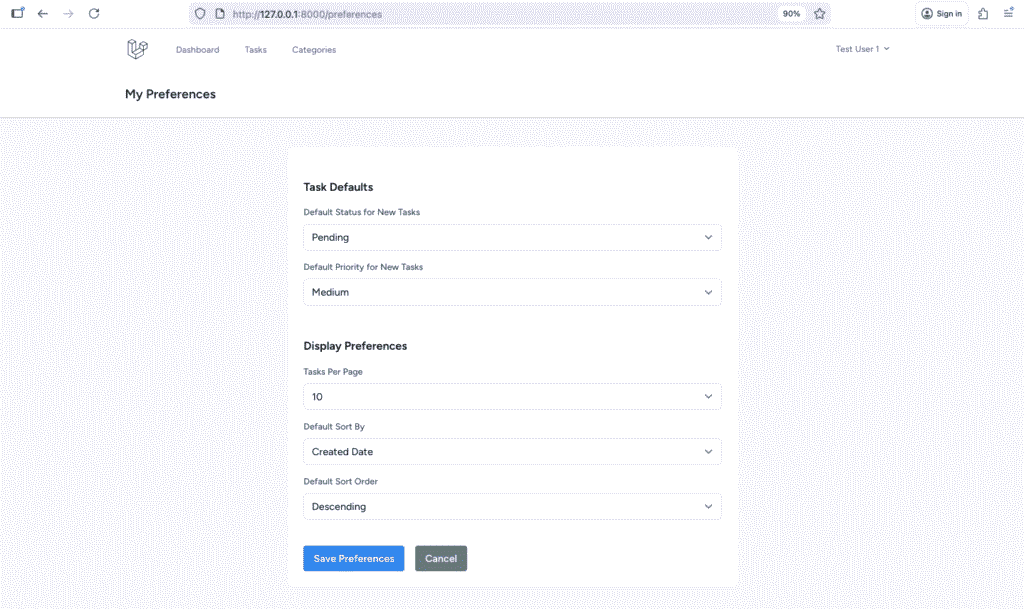
Step 8: Basic Task Automation
Let’s add some basic automation rules.
Creating Task Observer
php artisan make:observer TaskObserver --model=TaskEdit app/Observers/TaskObserver.php:
<?php

namespace App\Observers;

use App\Models\Task;

class TaskObserver
{
    /**
     * Handle the Task "creating" event.
     */
    public function creating(Task $task): void
    {
        // Auto-escalate priority if due within 2 days
        if ($task->due_date && $task->due_date->diffInDays(now()) <= 2) {
            if ($task->priority === 'low') {
                $task->priority = 'medium';
            } elseif ($task->priority === 'medium') {
                $task->priority = 'high';
            }
        }
    }

    /**
     * Handle the Task "updating" event.
     */
    public function updating(Task $task): void
    {
        // Auto-set completed timestamp when status changes to completed
        if ($task->isDirty('status') && $task->status === 'completed') {
            $task->completed_at = now();
        }

        // Reset completed timestamp if status changes from completed
        if ($task->isDirty('status') && $task->getOriginal('status') === 'completed' && $task->status !== 'completed') {
            $task->completed_at = null;
        }
    }
}
Adding Completed At Column
php artisan make:migration add_completed_at_to_tasks_tableEdit the migration:
<?php

use Illuminate\Database\Migrations\Migration;
use Illuminate\Database\Schema\Blueprint;
use Illuminate\Support\Facades\Schema;

return new class extends Migration
{
    public function up(): void
    {
        Schema::table('tasks', function (Blueprint $table) {
            $table->timestamp('completed_at')->nullable()->after('due_date');
        });
    }

    public function down(): void
    {
        Schema::table('tasks', function (Blueprint $table) {
            $table->dropColumn('completed_at');
        });
    }
};
Run migration:
php artisan migrateUpdate Task model:
protected $casts = [
    'due_date' => 'date',
    'completed_at' => 'datetime',
    'deleted_at' => 'datetime',
];
Registering the Observer
Edit app/Providers/AppServiceProvider.php:
<?php

namespace App\Providers;

use App\Models\Task;
use App\Observers\TaskObserver;
use Illuminate\Support\ServiceProvider;

class AppServiceProvider extends ServiceProvider
{
    public function register(): void
    {
        //
    }

    public function boot(): void
    {
        Task::observe(TaskObserver::class);
    }
}
What We’ve Accomplished
Congratulations! You’ve built an advanced task management system with professional features:
✅ Complete category management with color coding
✅ Beautiful, informative dashboard with statistics
✅ Completion rate tracking and visual progress
✅ Priority distribution analytics
✅ Kanban board for visual workflow management
✅ Advanced query scopes for flexible filtering
✅ Bulk operations for efficiency
✅ User preferences for customization
✅ Basic task automation with observers
✅ Status transition workflows
✅ Overdue task tracking
✅ Recent and upcoming task views
✅ Category usage statistics
Quick Recap
Key Commands Used
# Controllers
php artisan make:controller CategoryController --resource
php artisan make:controller DashboardController
php artisan make:controller PreferenceController

# Migration
php artisan make:migration create_user_preferences_table
php artisan make:migration add_completed_at_to_tasks_table
php artisan migrate

# Models
php artisan make:model UserPreference

# Observer
php artisan make:observer TaskObserver --model=Task
Important Concepts Learned
- Category CRUD with color management
- Dashboard with statistics and analytics
- Query scopes for flexible data retrieval
- Kanban board implementation
- Bulk operations with checkboxes
- User preferences storage
- Task automation with observers
- Status workflow management
- Performance optimization with eager loading
- Advanced filtering and grouping
Additional Resources
- Laravel Collections: https://laravel.com/docs/12.x/collections
- Query Scopes: https://laravel.com/docs/12.x/eloquent#query-scopes
- Observers: https://laravel.com/docs/12.x/eloquent#observers
- File Storage: https://laravel.com/docs/12.x/filesystem
Homework Challenge
Before Part 5, try these exercises:
-
Add Task Templates:
- Create a template table
- Allow users to save tasks as templates
- Quick create from a template
-
Task Notes/Comments:
- Add a notes section to tasks
- Allow users to add multiple notes
- Show notes timeline
-
Advanced Dashboard:
- Add a weekly completion chart using Chart.js
- Show productivity trends
- Add task heatmap calendar
-
Smart Categories:
- Auto-suggest categories based on task title
- Show category trends
- Recommend unused categories
Share your implementations in the comments!
Need Help?
Common questions:
- Colors not showing? Check hex color validation
- Statistics wrong? Verify eager loading and query scopes
- Bulk actions not working? Check the JavaScript console for errors
- Preferences not saving? Ensure migration ran successfully
Leave your questions in the comments!
Need to review CRUD? Go back to Part 3: CRUD Operations
